






Heroku Connect vs Stacksync: Real-Time Sync Showdown for Ops Teams
Compare Heroku Connect vs. Stacksync on real-time speed, connectivity, error handling, and cost to find the best data sync tool for your ops team.
- Author
- Ruben Burdin · Founder & CEO
- Published
- Updated
- Read time
- 8 min read

For modern operations, engineering, and RevOps teams, maintaining a single source of truth is not just a goal; it's a requirement for powering business-critical applications and driving business velocity. Real-time data synchronization is the backbone of this strategy.
This brings a critical challenge: choosing the right tool. Do you opt for an established, ecosystem-specific service like Heroku Connect, or a modern, dedicated platform like Stacksync? This article provides a direct comparison of Heroku Connect and Stacksync, evaluating key criteria like speed, connectivity, scalability, and cost to help your team make an informed decision.
What is Heroku Connect? A Look at Salesforce Data Sync
Heroku Connect is a data synchronization service that creates a connection between a Salesforce organization and a Heroku Postgres database [7]. Its primary function is to enable developers to interact with Salesforce data directly within their Heroku applications using standard SQL, simplifying development for apps built on the Heroku platform.
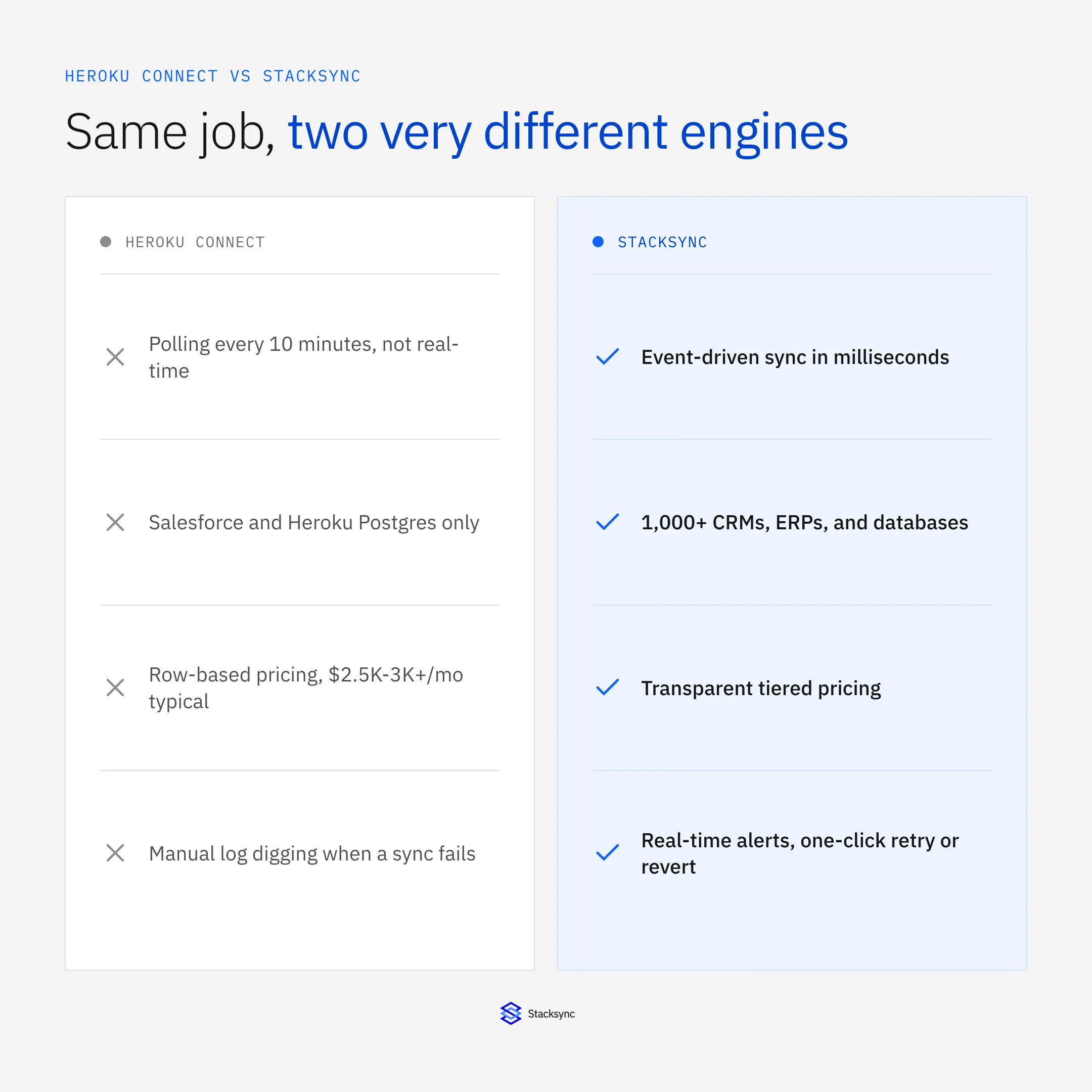
While Heroku Connect supports bi-directional sync, its architecture is fundamentally batch-based. Updates are processed through a polling mechanism, which typically has a minimum interval of 10 minutes. This latency means it's not a true real-time solution. The most significant limitation, however, is its nature as a point-to-point solution designed exclusively for the Salesforce and Heroku Postgres ecosystem. For teams needing to integrate a wider array of tools, Heroku Connect falls short. Furthermore, its pricing, which is often tied to the number of synced rows, can escalate quickly, creating significant and often unpredictable budget challenges [2].
Introducing Stacksync: The Real-Time, Bi-Directional Alternative
Stacksync is a modern data sync and workflow automation platform engineered for true real-time, bi-directional data movement. Unlike single-ecosystem tools, Stacksync is designed to connect a wide variety of systems, including CRMs like HubSpot and Pipedrive, ERPs such as NetSuite, and a vast range of databases like MySQL and Snowflake. This makes it one of the leading Heroku Connect and Fivetran vs Stacksync Real-Time Sync Platform for Mid-Market choices.
For ops teams, Stacksync’s key differentiators deliver tangible operational advantages:
- True Real-Time Speed: Data synchronization occurs in milliseconds, not minutes, driven by events as they happen.
- Native Two-Way Sync: The platform is built from the ground up for reliable bi-directional flows, with advanced conflict resolution to prevent data corruption.
- Issue Management: A dedicated dashboard provides real-time monitoring, alerts, and one-click resolution for sync errors, eliminating silent failures.
- Scalability: Engineered to handle millions of records from day one without performance degradation or surprise costs.
- Smart API Rate Limits: Automatically manages and optimizes API consumption to prevent hitting rate limits and disrupting service.
These Stacksync Features for Real-Time Bi-Directional Data Sync Efficiency are designed to lets technical teams, not burden them.
Head-to-Head Comparison: Stacksync vs. Heroku Connect
To better compare Heroku Connect and Stacksync, here is a breakdown of their core functionalities.
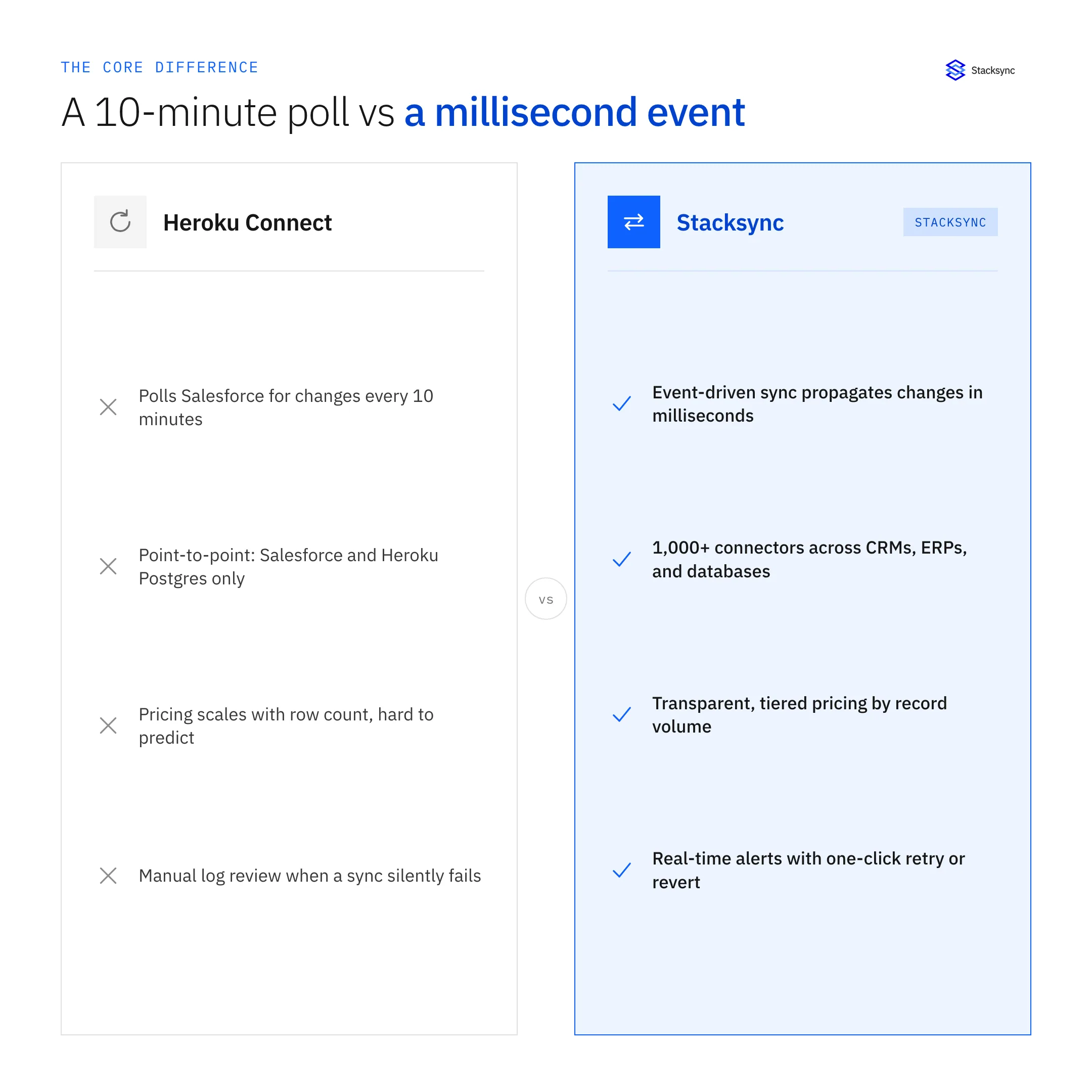
| Feature | Heroku Connect | Stacksync |
|---|---|---|
| Sync Speed | Batch-based (10-minute minimum interval) | Event-driven (millisecond latency) |
| Directionality | Bi-directional (with potential complexity) | Native bi-directional (real-time conflict resolution) |
| Connectivity | Salesforce & Heroku Postgres only | 1,000+ connectors (CRMs, ERPs, Databases) |
| Error Handling | Manual log review; prone to silent failures | Proactive dashboard with alerts & 1-click resolution |
| Scalability | Limited by row-based pricing and architecture | Built for millions of records with predictable costs |
| Pricing Model | Based on row count; can be unpredictable | Value-based plans; more cost-effective as data volume grows |
Key Takeaways
Stacksync delivers millisecond-level, real-time synchronization with native bi-directional support, proactive error handling, and predictable pricing designed for scalability.
Heroku Connect relies on batch-based sync and manual monitoring, limiting scalability and increasing costs as data volumes grow.
For teams seeking a modern, high-speed, and cost-efficient sync alternative, Stacksync provides the flexibility and reliability that legacy connectors lack.
Sync Speed and Directionality
Heroku Connect: Relies on batch-based synchronization, polling for changes at a minimum frequency of 10 minutes [8]. While it offers bi-directional capabilities, the delay and batch processing can lead to data conflicts that are complex to untangle.
Stacksync: Delivers true real-time, event-driven synchronization with changes propagating in milliseconds. Its architecture is natively designed for reliable two-way sync, which is a core advantage of Heroku Connect vs. dedicated Solutions: Choosing the Right CRM Sync Platform. This ensures data consistency is maintained across all connected systems without manual oversight.
Connectivity and Flexibility
Heroku Connect: Functions as a point-to-point solution, tightly locked into the Salesforce and Heroku Postgres ecosystem. It is not designed for integrating with other databases, ERPs, or modern SaaS applications, severely limiting its utility in a diverse tech stack.
Stacksync: is a platform-agnostic solution that offers a growing library of over 1,000 connectors. This allows organizations to build complex, multi-point integrations and automate workflows across their entire technology stack, making it one of the premier Stacksync vs Workato and Heroku Connect Alternatives for Real-Time Data Sync.
Error Handling and Reliability
Heroku Connect: Error resolution is often a manual and time-consuming process that requires digging through logs. The platform is susceptible to "silent failures," where sync issues can go unnoticed for extended periods, leading to data integrity problems.
Stacksync: Provides a proactive issue management dashboard. The Stacksync Platform offers real-time alerts via Slack or email and lets ops teams to retry or revert failed syncs with a single click. This reduces maintenance time and guarantees data reliability.
Pricing and Total Cost of Ownership (TCO)
Heroku Connect: Pricing is primarily based on the number of rows synced. This model can become prohibitively expensive as data volumes grow, leading to unpredictable costs that can be a major budget drain [3].
Stacksync: Offers more predictable and cost-effective pricing. By focusing on value and features rather than just penalizing data volume, Stacksync reduces the hidden costs associated with engineering maintenance, troubleshooting, and operational downtime. You can learn more by reading a Demystifying Pricing Models: A Comparative Analysis of Stacksync, Heroku Connect, and Workato.
How Other Integration Categories Compare
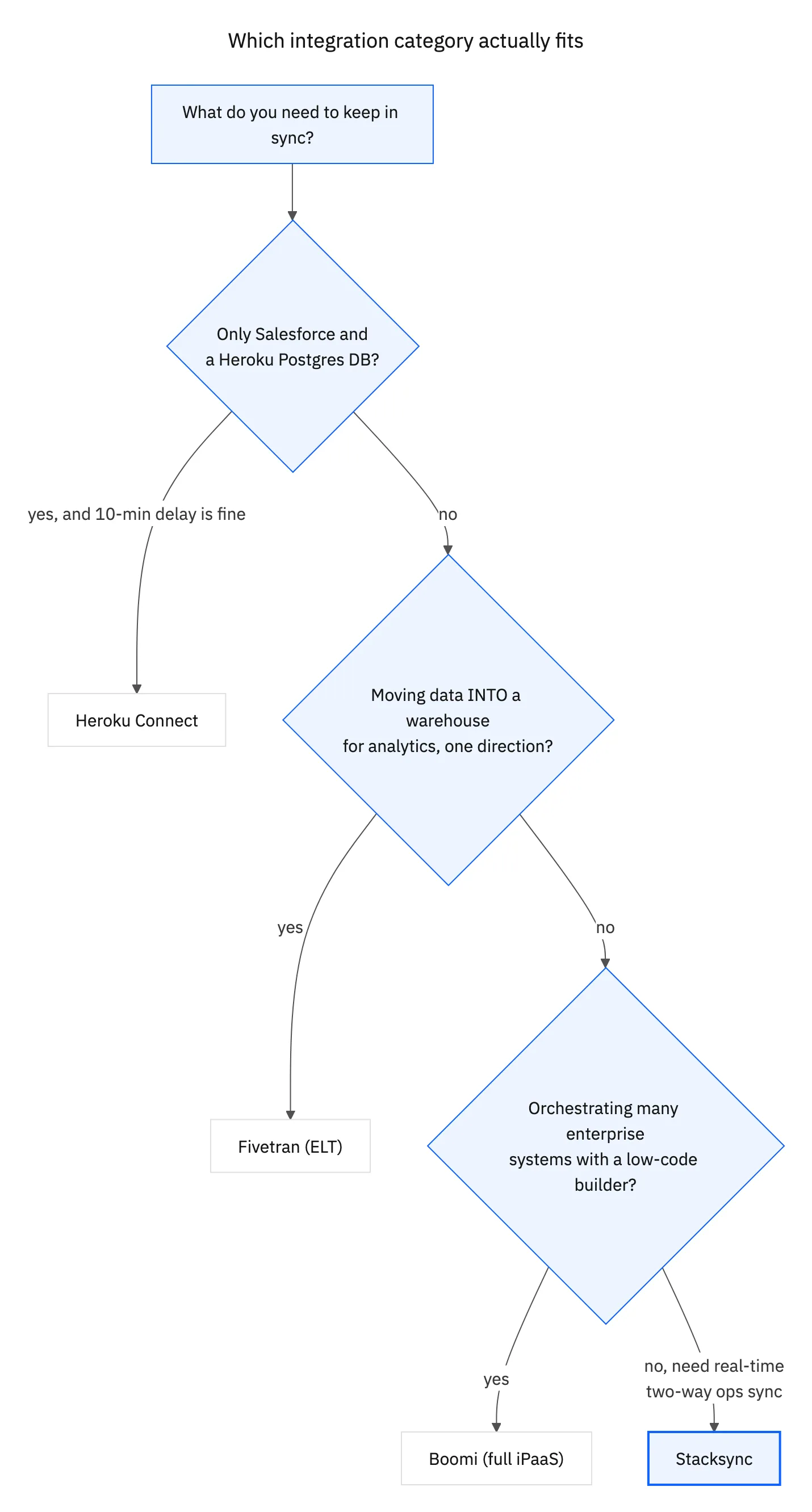
Ops teams evaluating Heroku Connect often also look at two adjacent categories: full iPaaS platforms like Boomi, and ELT pipelines like Fivetran. Neither solves the same problem as Stacksync, but knowing where each one fits helps narrow the decision.
Heroku Connect vs. Boomi: Point Solution vs. Full iPaaS
Boomi is a cloud-native Integration Platform as a Service (iPaaS) built for enterprise-wide integration, not just Salesforce-to-Postgres sync. Its low-code, drag-and-drop interface lets IT teams and business analysts build integrations across dozens of systems, not just two.
| Feature | Heroku Connect | Boomi |
|---|---|---|
| Core Function | Data sync service | Full iPaaS |
| Target User | Developers | IT teams and business analysts |
| Integration Approach | Point-to-point (SQL-based) | Low-code visual builder |
| Pricing Model | Row-based | Connector- or tier-based |
For a team that only needs Salesforce-Postgres sync, Boomi is overkill and expensive. For a team that needs to orchestrate dozens of systems, Boomi's breadth can be worth the added complexity. Neither is built for continuous, real-time bidirectional sync between two operational systems, which is where Stacksync fits.
Heroku Connect and Fivetran vs. Stacksync: Operational Sync vs. Analytics ELT
Fivetran is an ELT (Extract, Load, Transform) tool built to move data into a warehouse for analytics, not to keep two operational systems in sync. Its pricing is based on Monthly Active Rows (MAR), and its batch-based pipeline typically has latency measured in minutes to hours, not milliseconds.
| Feature | Heroku Connect | Fivetran | Stacksync |
|---|---|---|---|
| Sync Type | Bi-directional | One-way (uni-directional) | True bi-directional |
| Latency | Polling, ~10 minutes | Minutes to hours (batch) | Milliseconds |
| Connector Scope | Salesforce and Heroku Postgres only | 300+ connectors, mostly as warehouse sources | 1,000+ connectors (CRMs, ERPs, databases) |
| Primary Use Case | Salesforce app development | Centralizing data for BI and reporting | Real-time operational sync |
The distinction matters: if a sales rep closes a deal in Salesforce and that needs to instantly provision a record in Postgres and create an invoice in NetSuite, neither Heroku Connect's 10-minute polling nor Fivetran's batch latency can deliver it. That is a real-time, bidirectional sync problem, not an analytics pipeline problem.
What Heroku Connect Actually Costs
Heroku Connect is not sold as a standalone product. It is a contract-based add-on typically tied to Salesforce licenses and a Heroku Postgres instance, and pricing scales with the number of records synced, the number of Salesforce objects, and sync frequency requirements.
- Typical deployments run $2,500-$3,000 per month, separate from Heroku Postgres hosting costs.
- Getting bidirectional sync at all often requires a bundled enterprise plan; some teams report paying $4,000 or more per month once the required package tier is factored in.
- One customer cited in a public case study reported spending over $30,000 annually on Heroku Connect alone before switching.
Stacksync uses transparent, tiered pricing based on record volume rather than a bundled platform fee: plans start around $1,000/month for smaller deployments (about 50k records) and scale to roughly $3,000/month at 1M records, with volume discounts as record count grows. For the full three-way breakdown against Workato as well, see Demystifying Pricing Models: Stacksync vs. Heroku Connect vs. Workato.

Case Study: A Mid-Market Logistics Company Cuts Integration Costs
Acertus Delivers, a vehicle logistics company with roughly 565 employees and $215M in annual revenue, ran its Salesforce-Postgres sync on Heroku Connect while also managing integrations across Zendesk, NetSuite, and Snowflake.
At $2,500-$3,000/month, costs kept climbing as the company grew, and the point-to-point limitation meant every additional system needed its own custom integration. After switching to Stacksync, the company reported annual savings exceeding $30,000, improved real-time data availability, and successful expansion to 15-20 companies in their portfolio.
"Measurable improvements in data accuracy, processing time, and team productivity" is how Blair Koch, Chief Digital Officer at Acertus, described the outcome.
The Verdict: When to Choose Heroku Connect vs. Stacksync
Making the right choice depends entirely on your operational needs and technical ecosystem.
- Choose Heroku Connect if: your organization is deeply committed to the Heroku and Salesforce ecosystem, your only use case is syncing Salesforce data to a Heroku Postgres database, and delays of 10 minutes or more are acceptable.
- Choose Boomi if: you need to orchestrate integrations across dozens of enterprise systems and have the budget and team to manage a full iPaaS.
- Choose Fivetran if: your goal is centralizing data into a warehouse for analytics and reporting, not keeping two operational systems continuously in sync.
- Choose Stacksync if: you need true real-time, bidirectional sync for business-critical operations, need to integrate multiple systems beyond Salesforce, need reliable error handling, and want a cost-effective Heroku Connect alternative.
Ready to see the difference a real-time sync platform can make? Start your 14-day free trial with Stacksync.

FAQ
Frequently asked questions




Related articles


