Skip to content

The Complete Guide to NetSuite-Salesforce Integration (True Two-Way Sync)

Your complete guide to NetSuite-Salesforce integration: methods compared, object and field mapping, API rate limits, and real-time two-way sync.

Author
Alexis Favre · Co-Founder & CTO
Published
April 14, 2025
Read time
16 min read
The Complete Guide to NetSuite-Salesforce Integration (True Two-Way Sync)
APP TIPS

Salesforce runs the front office and NetSuite runs the back office, so the two systems hold different halves of the same customer. Sales works deals in Salesforce; finance and operations work orders, invoices, and inventory in NetSuite. When those halves drift apart, reps quote against stale pricing, finance reconciles orders by hand, and leadership reports off numbers that no longer match. Connecting the two is one of the most common, and most underestimated, integration projects a growing company will take on.

This guide covers how NetSuite-Salesforce integration actually works: which objects and records to map, the four ways to connect the systems and how they compare, how to survive Salesforce and NetSuite API rate limits, the difference between real-time and batch sync, and a step-by-step path to going live. It also explains why true two-way sync is harder than it looks, and how real-time two-way sync avoids the failure modes that sink most integrations.

What Is NetSuite-Salesforce Integration (and Why CRM-ERP Sync Matters)

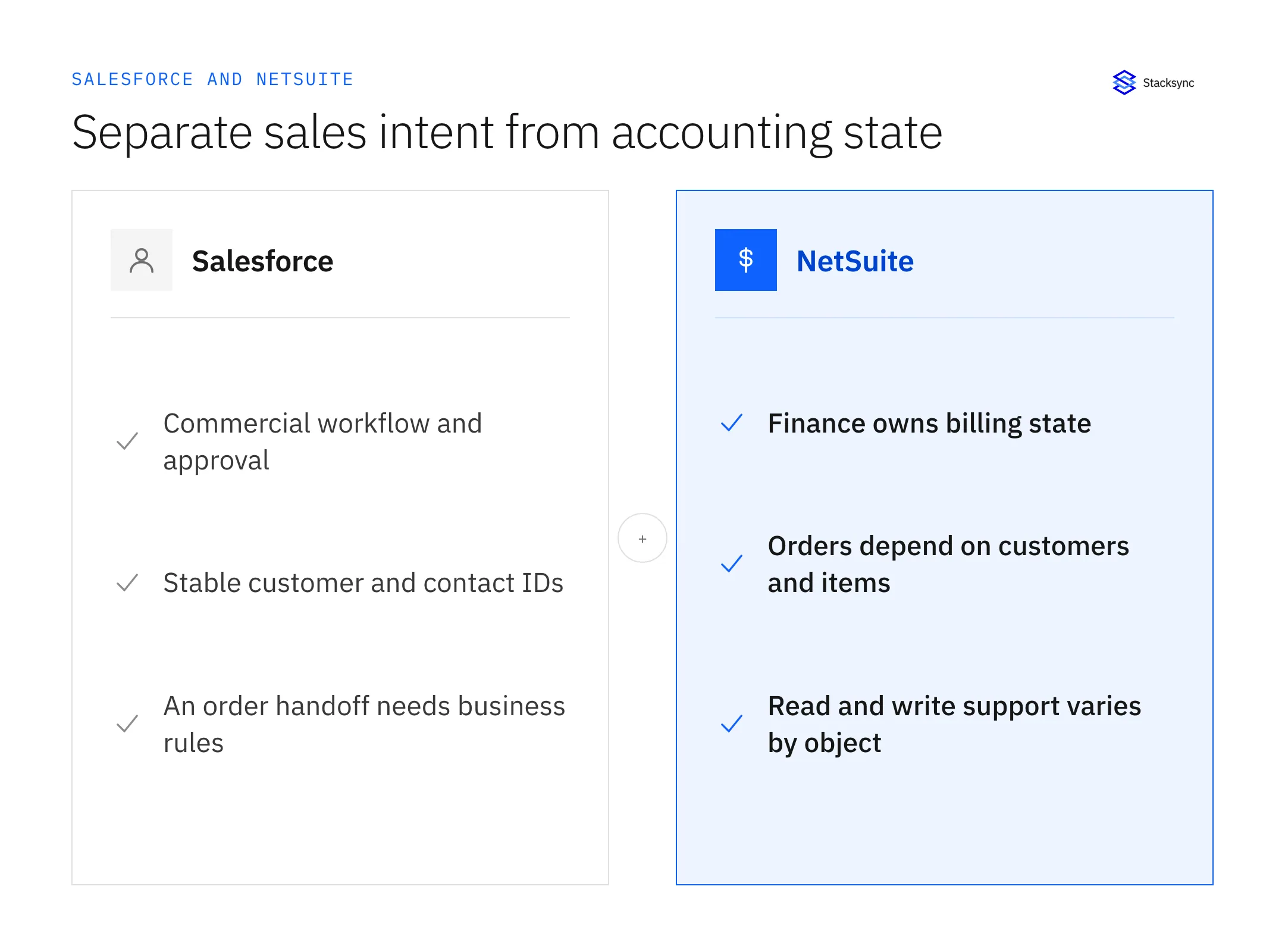
NetSuite-Salesforce integration is the practice of keeping records consistent between Salesforce (the CRM) and NetSuite (the ERP) so that a change in one system is reflected in the other. NetSuite is the system of record for financials and operations: general ledger, accounts receivable and payable, order management, inventory, procurement, and revenue recognition. Salesforce is the system of record for the customer relationship: leads, opportunities, accounts, contacts, cases, and forecasting.

Both platforms are deliberately good at different things, which is exactly why teams run both, and exactly why the seam between them matters. Without a reliable connection between your CRM and your ERP, the same data gets entered twice, discrepancies pile up, and no one trusts the numbers. The goal of integration is a single, current view of each customer across sales, finance, and operations, without anyone copying fields between tabs.

The cost of disconnected systems

  • Sales reps quote and forecast against outdated pricing, credit, or inventory data.
  • Finance teams manually re-key and reconcile orders, invoices, and payments.
  • Operations work from delayed fulfillment information, slowing order-to-cash.
  • Leadership makes decisions on reports stitched together from two sources of truth.
  • Engineers spend a large share of their time maintaining brittle, hand-built integration code instead of building product.

Top Use Cases: Quote-to-Cash, Order-to-Invoice, and Customer 360

Most NetSuite-Salesforce projects exist to support a handful of cross-system processes. Scoping integration around these workflows, rather than syncing everything at once, keeps the first phase focused and measurable.

Quote-to-cash and opportunity-to-order

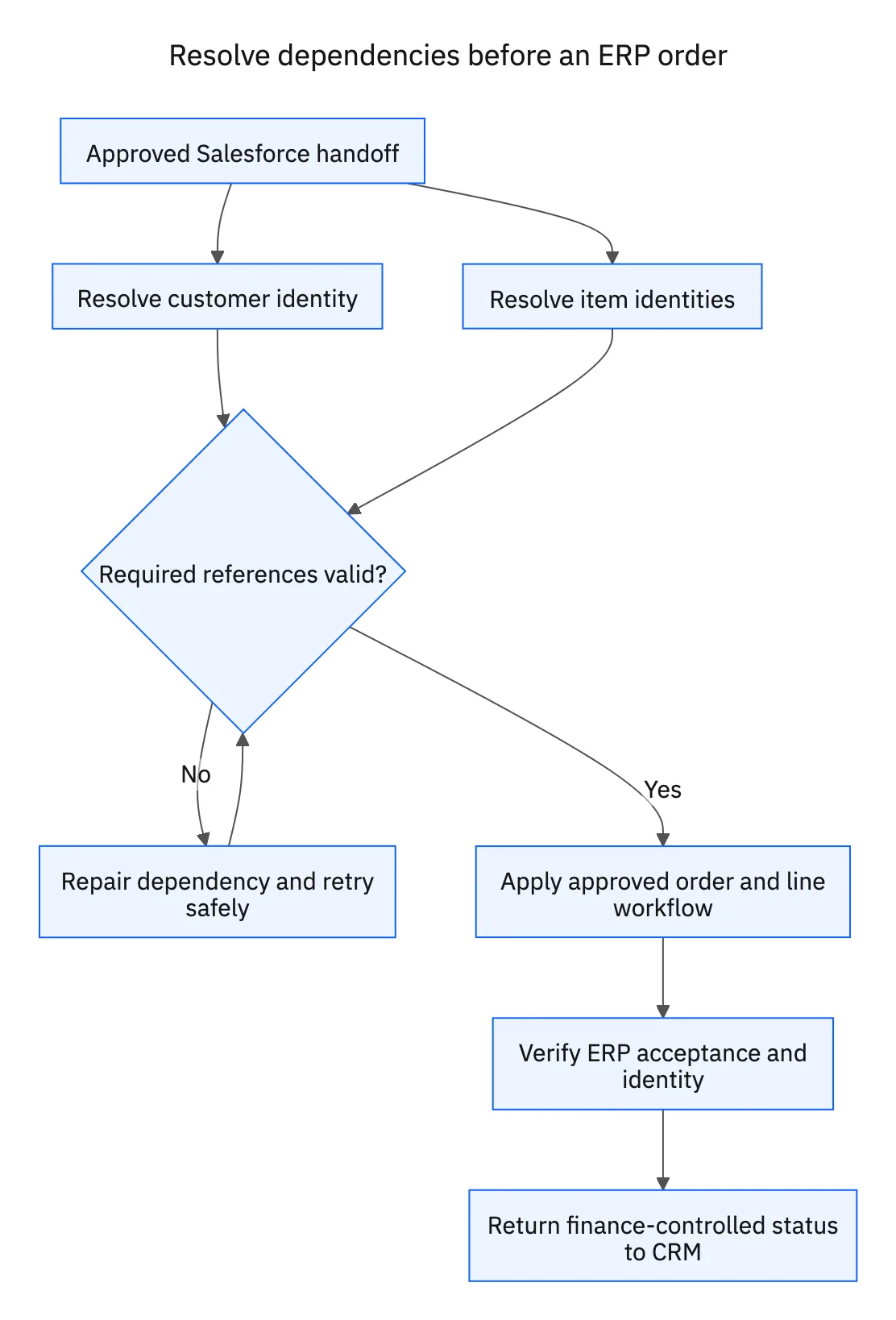
When an opportunity is marked Closed-Won in Salesforce, a corresponding sales order is created in NetSuite with the right account, line items, pricing, and quantities. Fulfillment, invoicing, and payment then flow without a manual handoff. This is the highest-value flow for most companies because it shortens the sales cycle and removes re-keying between the deal and the order.

Order-to-invoice and billing visibility

Invoices, payments, and order status created in NetSuite flow back to Salesforce so customer-facing teams can answer billing and fulfillment questions without leaving the CRM. Finance keeps NetSuite as the authority for financial records; sales simply gets read access to the truth.

Customer 360 and forecasting

Account, contact, and product data stay aligned in both directions, so a rep sees real credit limits, order history, and inventory availability during a call, while finance sees the live pipeline. Synchronized data also feeds more accurate revenue forecasting and reporting because everyone is working from the same record.

What to Sync: Mapping Salesforce Objects to NetSuite Records

Salesforce and NetSuite model the same business concepts with different schemas, object names, and relationships, so the first design decision is which entities map to which, and which way each should flow. The table below shows the common object pairings and a typical direction of authority. Direction is a starting point, not a rule: you decide the source of truth per object based on your processes.

Salesforce objectNetSuite recordTypical sync directionNotes
AccountCustomer / CompanyTwo-wayOften the anchor record; match on a shared external ID to prevent duplicates.
ContactContactTwo-wayLinked to the parent Account/Customer relationship.
OpportunityEstimate / Sales OrderSalesforce to NetSuiteClosed-Won typically triggers sales order creation.
Product / Pricebook entryItem / PriceNetSuite to SalesforceNetSuite owns the catalog, pricing, and availability.
OrderSales OrderTwo-wayStatus and fulfillment updates flow back to Salesforce.
Invoice (custom object)InvoiceNetSuite to SalesforceFinance owns the invoice; CRM gets read visibility.
Payment (custom object)Customer PaymentNetSuite to SalesforceUsed for billing status and collections context.

Custom objects and custom fields are common on both sides and need to be part of the plan from the start. A good integration handles standard objects, custom objects, lookups, and reference fields, not just the textbook account-and-contact example.

The 4 Ways to Integrate NetSuite and Salesforce

There are four broad approaches to connecting the two systems. They differ in setup effort, ongoing maintenance, latency, and how well they handle two-way data flow.

1. Native and packaged connectors

Apps such as Breadwinner and other listed connectors plug directly into platform APIs and handle standard objects with minimal configuration. They are quick to stand up for simple, low-volume scenarios. The trade-offs: many rely on scheduled polling rather than event-driven updates, support for deep customization and complex transformations is limited, and they are often too rigid for high-frequency, business-critical flows.

2. iPaaS and middleware platforms

Integration Platform as a Service tools, including Celigo, Dell Boomi, Workato, MuleSoft, and Jitterbit, provide pre-built connectors, transformation engines, and workflow orchestration across many systems at once. They are flexible and capable, which makes them a fit when you need to connect more than just these two applications. The cost is complexity: configuration takes weeks to months, specialized skills are usually required, and total cost of ownership grows with data volume and the number of recipes you maintain.

3. Custom API development

You can build directly against Salesforce REST/SOAP APIs and NetSuite's SuiteTalk (REST/SOAP) and RESTlets, typically with Apex on the Salesforce side, RESTlet scripts on the NetSuite side, and middleware in Node.js, Python, or Java. This gives complete control over logic and transformations. It also makes your team responsible for authentication, rate limiting, retries, error recovery, and monitoring, with months of initial development and continuous maintenance. Custom builds are notoriously brittle precisely because all of that plumbing is hand-rolled.

4. Real-time two-way sync platforms

Purpose-built sync platforms such as Stacksync focus on one job: keeping operational systems consistent in real time, in both directions. They use change data capture and an event-driven model rather than scheduled batches, manage API usage automatically, and ship with conflict resolution, retries, and monitoring built in. Standard scenarios are configured no-code in days. This is the approach designed for the operational, always-current data flow that NetSuite-Salesforce integration actually demands.

One-Way vs True Bi-Directional Sync: Why Two-Way Is Hard

One-way sync pushes changes from a source to a target in a single direction. It is straightforward and fine when only one system should ever own a record. True two-way sync means a change in either system propagates to the other while both stay consistent, which is what cross-functional processes like quote-to-cash require.

The common shortcut is to stitch two one-way pipelines together and call it bidirectional. It is not. The moment the same record is edited in both systems within a short window, the two pipelines fight: one update overwrites the other, or they bounce changes back and forth in an update loop that burns API calls and corrupts data. Real two-way sync has to understand the state of a record on both sides, detect what actually changed at the field level, prevent echo loops, and decide a winner when edits genuinely collide.

Conflict resolution

When the same record changes in both systems simultaneously, the platform needs a deterministic rule for who wins. Stacksync applies configurable conflict resolution: by system (Salesforce wins or NetSuite wins), by individual field, or by most recent timestamp. Every conflict is logged so your team keeps full visibility into which value was kept and why. Field-level change detection means a finance edit to payment terms and a sales edit to a billing contact on the same account do not overwrite each other, because only the changed fields move.

Real-Time vs Batch/Scheduled Sync

Batch integration, the model behind ETL, ELT, and most polling connectors, moves data on a schedule. It checks for changes every few minutes or hours, which is acceptable for analytics and warehousing but introduces a window where the two systems disagree. For operational data, that window is where bad quotes, oversells, and duplicate work happen.

Real-time sync is event-driven. Instead of polling, it reacts to change events as they occur using change data capture, so an update in one system appears in the other within seconds. That keeps both systems current for the workflows that cannot tolerate lag, and it is far more efficient with API calls because it only acts when something actually changes rather than repeatedly scanning for differences.

DimensionBatch / scheduledReal-time two-way sync
LatencyMinutes to hoursSeconds
Trigger modelPolling on a scheduleEvent-driven (change data capture)
DirectionUsually one-way per pipelineTrue two-way with conflict handling
API efficiencyRepeated scans waste callsCalls only when data changes
Best fitAnalytics, warehousing, reportingOperational CRM-ERP processes

Beating Salesforce and NetSuite API Rate Limits at Scale

API rate limits are the single most common reason NetSuite-Salesforce integrations fail in production. Both platforms cap how much an application can do in a given window to protect their multi-tenant infrastructure, and an integration that ignores those caps will eventually stall mid-sync, leaving partial updates and inconsistent data across the two systems.

  • Salesforce enforces a daily API request allocation (allocations vary by edition and licensing) and separate Bulk API batch limits and concurrent-request limits.
  • NetSuite governs SuiteTalk web services with a concurrency model tied to your account tier and SuiteCloud licensing, and meters SuiteScript with per-script usage units.

Naive integrations, especially custom code and polling connectors, hammer these limits because they scan constantly and make a separate call per record. A resilient architecture is built around a few principles:

  • Event-driven updates: act only on real change events instead of polling, so calls are spent only when needed.
  • Intelligent batching: group many small updates into optimized calls rather than one call per record.
  • Backpressure: automatically throttle as you approach a limit instead of failing through it.
  • API selection: route work to the most efficient interface for the job (REST, SOAP, or Bulk) depending on volume.
How Stacksync stays under the limits
Stacksync manages API consumption for you. It uses change data capture so it only calls when data changes, batches and compresses payloads, applies backpressure as quotas approach, and dynamically selects between REST, SOAP, and Bulk APIs to maximize throughput. There is no manual quota juggling, and retries with replay mean a transient limit or outage resumes cleanly instead of dropping records. (Always confirm current platform limits against Salesforce and NetSuite documentation, since allocations vary by edition and licensing.)

Data Modeling, Field Mapping, and Transformations

Because the two schemas differ, field mapping is where integrations succeed or quietly break. Each mapped object pair needs explicit, documented relationships and transformation rules: data type conversions, picklist and status value translation, currency and unit handling, and lookups that resolve references between systems.

Two safeguards prevent the most common data problems. First, match records on a stable shared key, usually an external ID written back to both systems, so the integration updates the right record instead of creating a duplicate. Second, clean the data before you turn sync on; integration surfaces every inconsistency and duplicate that already exists in either system, so pre-integration cleansing and validation rules save real pain later.

Stacksync suggests field mappings automatically, supports standard and custom objects, and handles type conversions and transformations through an intermediate layer that bridges the two data models, so you are not writing per-object scripts to translate between schemas.

NetSuite-Salesforce Integration Tools Compared

The table below compares the main options across the dimensions that matter most for an operational CRM-ERP connection: how data flows, how fresh it is, custom object support, time to stand up, and ongoing burden.

Tool / approachTypeSync directionLatencyCustom objectsSetup timeBest for
Native connector (e.g. Breadwinner)Packaged appOften one-way / limited two-wayBatch / pollingLimitedHours-daysSimple, low-volume standard syncs
CeligoiPaaSConfigurableBatch (near real-time options)YesWeeksPre-built NetSuite-Salesforce flows
Dell BoomiiPaaSConfigurableBatchYesWeeks-monthsBroad multi-system integration
WorkatoiPaaSConfigurableBatch / recipe-basedYesWeeksLow-code automation across many apps
MuleSoftiPaaS / APIConfigurableVariableYesMonthsLarge enterprises with API strategy
Custom API codeDIY buildCustom buildWhatever you buildYes (you build it)MonthsHighly unique requirements with dev capacity
StacksyncReal-time two-way syncTrue bi-directionalReal-time (seconds)YesDaysOperational, always-current CRM-ERP sync

iPaaS platforms are the right call when the project is really a many-system integration program. Native connectors fit small, simple needs. Custom code fits genuinely unique logic backed by a team that wants to own the maintenance. For the specific job of keeping Salesforce and NetSuite consistent in real time, in both directions, a purpose-built sync platform removes the most failure-prone parts of the work.

See real-time two-way sync in action
Book a demo with real engineers, no sales script.
Book a demo

How Stacksync Delivers Real-Time, No-Code, Two-Way Sync

Stacksync is built specifically for real-time, true two-way sync between operational systems. It connects Salesforce and NetSuite (and 1,000+ other systems and databases through its connectors) and keeps records aligned without custom code or scheduled jobs.

  • True two-way sync engine: changes in either system propagate in real time with field-level consistency, not two stitched one-way pipelines.
  • Change data capture: detects and moves only what changed, which cuts API usage and keeps latency to seconds.
  • Intermediate database layer: bridges the two schemas so mapping and transformations happen without per-object scripting.
  • Automated conflict resolution: configurable by system, field, or timestamp, with every conflict logged.
  • Reliability built in: retries, replay of failed events, detailed logs, and dynamic API management to stay under rate limits.
  • Workflow automation: trigger downstream processes on data events, such as creating a NetSuite sales order when an opportunity reaches Closed-Won.
  • Monitoring: a dashboard for sync status with alerts via email, Slack, PagerDuty, or webhook.

Step-by-Step: Setting Up a NetSuite-Salesforce Sync

The sequence below mirrors how a real-time two-way sync is configured with Stacksync. The same phases apply to any approach; with a purpose-built platform, each one is configuration rather than development.

  1. 01
    Connect both systems securely
    Authenticate Salesforce and NetSuite using OAuth 2.0 or API credentials, and confirm API permissions. Enterprise options include SSL, SSH tunneling, and VPC peering.
  2. 02
    Select objects and map fields
    Choose the standard and custom objects to sync, accept or adjust suggested field mappings, and define type conversions and transformation rules between the two schemas.
  3. 03
    Configure direction and conflict rules
    Set the sync direction per object, choose the source of truth, and define conflict resolution (by system, field, or timestamp) plus validation and error handling.
  4. 04
    Test in a sandbox
    Validate mappings and data integrity in a non-production environment, and simulate edge cases such as simultaneous edits and API failures before go-live.
  5. 05
    Activate workflow automation
    Turn on event-driven actions, for example generating a NetSuite sales order with line items and customer data when a Salesforce opportunity is Closed-Won.
  6. 06
    Go live and monitor
    Activate real-time sync, watch status on the dashboard, set alerts, and review logs. Roll out in phases, starting with accounts and contacts before adding orders and invoices.

Cost, Security, and Compliance

Total cost of ownership

Compare approaches on total cost, not sticker price. Custom builds carry large upfront development plus open-ended maintenance and the engineering time spent firefighting broken syncs. iPaaS subscriptions tend to climb with data volume and recipe count, on top of implementation services. The cost that hurts most is the hidden one: the share of engineering time that goes to keeping a fragile integration alive instead of shipping product. Stacksync uses usage-based, tiered pricing, typically starting around $1,000 per month, so spend scales with what you sync and stays predictable as volume grows.

Security and compliance

You are moving financial and customer records, so security is non-negotiable. Stacksync is certified for SOC 2, ISO 27001, HIPAA, GDPR, and CCPA, encrypts data in transit and at rest, and passes data through without persistent storage. Role-based access controls and complete audit trails support governance and regulatory reporting. Confirm that any integration approach meets your encryption, access-control, and data-residency requirements before go-live.

Troubleshooting and Common Pitfalls

Most NetSuite-Salesforce issues trace back to a handful of root causes. Knowing them in advance shapes a more durable design.

  • Duplicate records: caused by matching on the wrong key or no shared external ID. Match on a stable identifier written back to both systems.
  • Update wars and loops: the signature of two one-way pipelines posing as two-way sync. Use a real two-way engine with field-level change detection and loop prevention.
  • Silent sync failures: errors that go unnoticed until data has drifted. Require automated retries, replay, alerting, and logs, not after-the-fact discovery.
  • Rate-limit stalls: integrations that ignore API quotas. Use event-driven calls, batching, and backpressure rather than constant polling.
  • Schema drift: platform or admin changes break mappings. Test mappings against updates and prefer a layer that adapts to schema changes.
  • Dirty source data: integration exposes existing duplicates and gaps. Cleanse and add validation rules before turning sync on.
  • Over-customization: undocumented custom logic in either system complicates mapping. Document business rules and map them deliberately.

Bringing Salesforce and NetSuite Together

NetSuite-Salesforce integration is no longer a months-long engineering project by default. The method you choose decides the outcome: native connectors fit simple needs, iPaaS fits broad multi-system programs, custom code fits unique logic with a team to maintain it, and a purpose-built platform fits the common case of keeping CRM and ERP consistent in real time. Whichever path you take, design around clear object mapping, an explicit source of truth, real conflict resolution, and respect for API limits.

Stacksync delivers real-time, true two-way sync between Salesforce, NetSuite, and your wider stack, with conflict resolution, automatic rate-limit handling, and reliability built in. See how two-way sync works, browse the connector library, or explore the ERP integration page to plan your rollout.

FAQ

Frequently asked questions

What is NetSuite-Salesforce integration?
It is the practice of keeping records consistent between Salesforce (CRM) and NetSuite (ERP) so a change in one system is reflected in the other. NetSuite owns financials and operations; Salesforce owns the customer relationship. Integration gives sales, finance, and operations a single, current view of each customer instead of two diverging copies.
What data can you sync between Salesforce and NetSuite?
Standard and custom objects on both sides: accounts/customers, contacts, opportunities/estimates, orders/sales orders, products/items and pricing, invoices, and payments, plus custom fields. Field mappings handle the different data models between Salesforce CRM and NetSuite ERP, including lookups and reference fields.
What are the ways to integrate NetSuite and Salesforce?
Four broad approaches: native or packaged connectors (such as Breadwinner) for simple needs; iPaaS platforms (Celigo, Dell Boomi, Workato, MuleSoft) for multi-system programs; custom API development against Salesforce and NetSuite APIs for unique logic; and real-time two-way sync platforms like Stacksync for keeping the two systems consistent in real time with minimal maintenance.
How does real-time two-way sync differ from the native connector or batch sync?
Native connectors and batch tools usually poll on a schedule and move data one way per pipeline, leaving a window where the systems disagree. Real-time two-way sync is event-driven: it reacts to changes as they happen using change data capture, propagates updates in both directions within seconds, and resolves conflicts when the same record changes on both sides.
How does Stacksync handle Salesforce and NetSuite API rate limits?
Stacksync manages API usage automatically. It uses change data capture so it only calls when data changes, batches and compresses payloads, applies backpressure as quotas approach, and dynamically selects between REST, SOAP, and Bulk APIs for the most efficient path. This prevents the throttling and mid-sync stalls that commonly break custom and polling-based integrations.
How are conflicts resolved when a record changes in both systems?
Stacksync applies configurable conflict resolution rules. You can set priority by system (Salesforce wins or NetSuite wins), by individual field, or by most recent timestamp. Field-level change detection moves only the fields that changed, and every conflict is logged so your team keeps full visibility into which value was kept.
How long does a NetSuite-Salesforce integration take?
It depends on the approach. Custom API builds typically run months; iPaaS implementations run weeks to months; native connectors can be hours to days for simple cases. A purpose-built real-time platform like Stacksync usually goes live within days, covering authentication, field mapping, test validation, and production cutover. Budget time for data cleansing and testing regardless of method.
How much does NetSuite-Salesforce integration cost?
Costs vary widely by approach, and total cost of ownership matters more than the subscription line. Custom builds carry heavy upfront development plus ongoing maintenance; iPaaS pricing tends to grow with data volume and recipes. Stacksync uses usage-based, tiered pricing, typically starting around $1,000 per month, so spend scales predictably with what you sync.
Can custom objects and fields be synced?
Yes. Stacksync supports standard and custom objects in both Salesforce and NetSuite, with automatic field mapping suggestions that can be customized for complex scenarios, including custom fields, lookups, and reference relationships, without writing per-object scripts.
Is Stacksync secure and compliant?
Yes. Stacksync is certified for SOC 2, ISO 27001, HIPAA, GDPR, and CCPA. Data is encrypted in transit and at rest, it is passed through without persistent storage, and role-based access controls with complete audit trails support governance and regulatory reporting.
Which records should I sync first?
Take a phased approach. Start with accounts and contacts to establish a clean, matched customer record, then add the product catalog, then opportunity-to-order conversion, then invoice and payment visibility, and finally advanced scenarios. Phasing keeps the first go-live focused and makes each step easy to validate.

About the author

Alexis Favre
Co-Founder & CTO

Alexis Favre is the Co-Founder and CTO of Stacksync (YC W24), the first real-time and two-way sync for enterprise data at scale. Alexis is a Y Combinator alumni with expertise in large scale data engineering.

All posts by Alexis Favre

About Stacksync

Stacksync powers real-time, two-way sync between CRMs, ERPs, and databases. Engineers sync data at scale and automate workflows, not dirty API plumbing.

Coworkers laughing in front of a laptop in a casual office setting

Your last integration took months.
Your next one takes a prompt.