






Shopify HubSpot Integration: Two-Way Data Sync Guide (2026)
How to set up Shopify HubSpot integration with real-time two-way data sync. Compare native, iPaaS, and dedicated hubspot shopify connector solutions.
- Author
- Ruben Burdin · Founder & CEO
- Published
- Updated
- Read time
- 13 min read

Introduction
For e-commerce businesses, Shopify HubSpot integration is not just convenient. It's essential for operational efficiency and growth. When your store data and customer relationship management (CRM) system operate in isolation, you're forcing your team to manually update information, increasing the risk of errors and missed opportunities.
Effective Shopify HubSpot data sync eliminates these problems by creating a unified ecosystem where customer information, order details, marketing activities, and sales data flow automatically between platforms in real-time. This integration removes the disconnected records that commonly plague e-commerce operations and marketing teams.
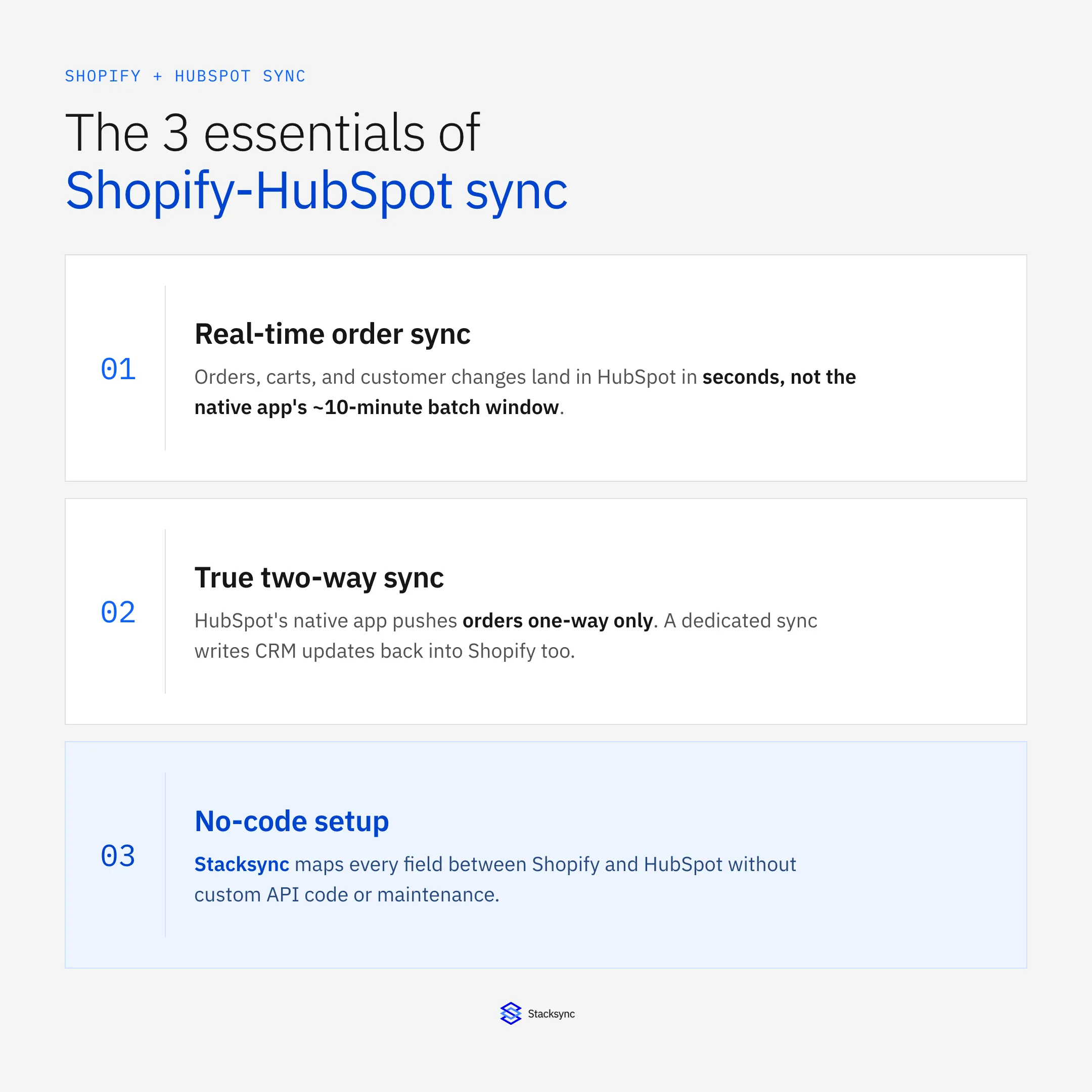
This guide covers why Shopify HubSpot sync matters, the challenges you'll face, and practical methods for implementing an effective integration. Whether you're starting fresh or optimizing an existing setup, you'll find actionable steps to improve your e-commerce operations.
The Challenges of Shopify-HubSpot Data Integration
Before diving into solutions, it's important to understand the specific challenges that make Shopify-HubSpot integration necessary:
Fragmented Customer Data
Without proper integration, your customer information exists in separate silos. Your Shopify store captures purchase history, shipping details, and product preferences, while HubSpot stores email engagement, support tickets, and marketing interactions. This fragmentation prevents you from building a complete view of each customer, limiting your ability to deliver personalized experiences.
Manual Data Entry and Human Error
When systems don't communicate automatically, someone on your team must manually transfer data between platforms. This repetitive task is not only time-consuming but also prone to errors. A simple typo in customer information can lead to failed email campaigns, shipping problems, or reporting inaccuracies that affect business decisions.
Delayed Decision Making
Without real-time data synchronization, there's inevitably a lag between when actions occur in one system and when that information becomes available in the other. This delay means marketing teams might be working with outdated customer information, or sales teams might not see recent purchase activity when engaging with customers.
Inconsistent Reporting
When Shopify and HubSpot maintain separate versions of the same data, generating accurate reports becomes challenging. Marketing attribution, customer lifetime value calculations, and performance metrics can vary depending on which system is used as the source of truth, making it difficult to measure true business performance.
Benefits of Automated Shopify-HubSpot Data Synchronization
Implementing proper data synchronization between Shopify and HubSpot delivers substantial benefits:
Unified Customer View
With bidirectional sync between your e-commerce platform and CRM, you gain a 360-degree view of each customer. Sales, marketing, and support teams all access the same up-to-date information, enabling more informed interactions and personalized customer experiences.
Time Savings and Reduced Manual Work
Automated synchronization eliminates the need for manual data entry and export-import processes. Studies show that organizations can save 30-50% of the time previously spent on manual data management when implementing proper integration solutions.
Improved Marketing Effectiveness
When HubSpot has real-time access to Shopify purchase data, you can create more targeted marketing campaigns. For example, you can automatically trigger post-purchase email sequences, build segments based on product preferences, or create abandoned cart recovery workflows that use data from both systems.
Enhanced Customer Experience
With synchronized data, every customer touchpoint improves. Support teams can see recent purchases when handling tickets, marketing communications reflect current customer status, and the online shopping experience can be personalized based on comprehensive customer history.
Better Analytics and Business Intelligence
When data flows freely between systems, your reporting capabilities expand dramatically. You can analyze the customer journey from first marketing touch to repeat purchase, track conversion rates more accurately, and make data-driven decisions with confidence.
Key Data Points to Synchronize Between Shopify and HubSpot
For effective integration, focus on synchronizing these critical data points:
Customer Information
- Contact details (name, email, phone)
- Shipping and billing addresses
- Customer account status (new, returning, VIP)
- Communication preferences and opt-in status
Order Data
- Purchase history and order details
- Order status updates (processing, shipped, delivered)
- Cart abandonment events
- Return/refund information
Product Information
- Product catalog details
- Inventory levels
- Pricing updates
- Product categories and collections
Marketing Engagement
- Email interaction history
- Campaign attribution data
- Website behavior and browsing history
- Coupon and discount usage
Custom Fields and Properties
- Loyalty program status
- Customer lifetime value calculations
- Customer segments and tags
- Purchase frequency metrics
Does HubSpot Have a Native Shopify Integration?
Yes. HubSpot ships a free native app called Shopify (Data Sync), available from the HubSpot Marketplace or under Settings > Integrations > Connected Apps > Shopify. It syncs several object types automatically once you turn on the CRM sync, but it has real gaps that matter before you treat it as your whole integration.
| Object | Sync direction | What that means |
|---|---|---|
| Contacts ↔ Customers | Two-way | A change in HubSpot flows to the matching Shopify customer, and vice versa |
| Companies ↔ Companies | Two-way | Company records stay aligned in both directions |
| Products ↔ Products | Two-way | Price and catalog changes sync either direction |
| Orders ← Orders | One-way, Shopify to HubSpot only | HubSpot workflows cannot write status or fulfillment changes back to Shopify |
| Carts ← Abandoned Checkouts | One-way, Shopify to HubSpot only | Feeds abandoned-cart email sequences; nothing writes back |
Where the Native Integration Falls Short
- Not real-time. After the initial sync finishes, HubSpot documents that records update within about 10 minutes of a change, not instantly.
- Orders are one-way only. There is no built-in path for a HubSpot workflow to push a refund, fulfillment update, or status change back into Shopify.
- No custom field mapping beyond the five objects above. A loyalty tier or a Shopify metafield has no native path into HubSpot.
- No conflict resolution. If the same customer record changes in both systems within the same window, there is no rule for which value wins.
For a store with real order volume, the 10-minute lag and one-way order flow are the two limits that push teams toward a dedicated two-way sync layer.
What True Two-Way Sync Looks Like Instead
A record that changes in either system goes through the same steps end to end, including a defined rule for what happens when both sides edit it at once:
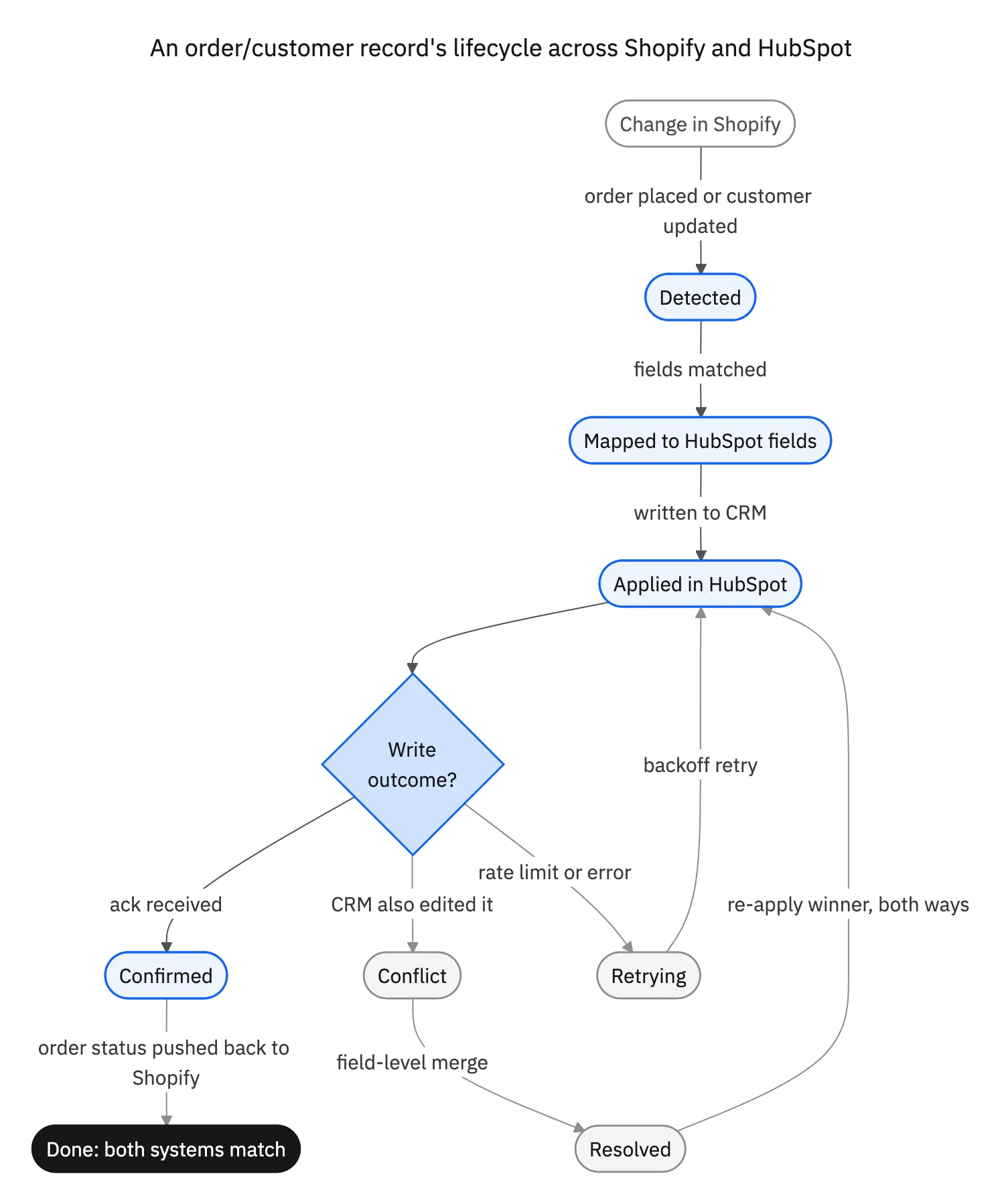
That last step, writing HubSpot changes back into Shopify, is exactly what the native app cannot do for orders. It's the difference between a one-way feed and a true two-way sync.
Shopify-HubSpot Data Sync Implementation Options
Establishing data sync between Shopify and HubSpot comes down to a few options:
| Factor | Native Integration | iPaaS Platform | Custom API Build |
|---|---|---|---|
| Sync Direction | One-way only, Shopify to HubSpot | Bidirectional real-time sync | Fully customizable direction |
| Setup Time | Minutes to configure | Hours to days for full setup | Weeks to months of development |
| Customization | Limited to predefined fields | Custom field mapping and transforms | Complete control over logic |
| Maintenance | Vendor managed, minimal effort | Platform handles updates and fixes | Ongoing dev resources required |
| Error Handling | Basic notifications only | Retry logic, monitoring, alerts | Must build from scratch |
| Cost Structure | Included with HubSpot plan | Monthly subscription based on usage | High upfront plus maintenance |
| Best For | Small stores with basic needs | Growing businesses needing flexibility | Enterprises with unique requirements |
Key Takeaways
iPaaS platforms offer the best balance of power and simplicity for most e-commerce businesses requiring real-time bidirectional sync.
Avoid custom API builds unless you have dedicated engineering resources and truly unique requirements that no platform can address.
Start with your sync direction needs: if you only need Shopify to HubSpot, native works. For bidirectional, choose an iPaaS solution.
1. Native Integration Capabilities
HubSpot offers a direct Shopify integration that provides basic connectivity between the platforms. This native integration allows for:
- One-way sync of customer data from Shopify to HubSpot
- Basic order information transfer
- Simple automation around purchase events
Pros: Quick to set up, no additional subscription required, officially supported by both platforms.
Cons: Limited customization, primarily one-directional, restricted to predefined data fields.
2. Third-Party Integration Platforms
For more advanced synchronization, specialized integration platforms provide enhanced capabilities:
Data Integration Platforms (iPaaS)
Platforms like Stacksync, Workato, or Integromat offer comprehensive solutions with:
- Bidirectional, real-time synchronization
- Custom field mapping and data transformation
- Advanced workflow automation
- Error handling and monitoring
These platforms typically function as middleware that connects your Shopify store and HubSpot instance through their respective APIs, handling the complex data transformation, conflict resolution, and continuous updates.
Pros: More powerful and flexible, real-time capabilities, extensive customization options.
Cons: Additional cost, may require some technical setup.
Point Solution Connectors
Some tools function as a dedicated HubSpot Shopify connector rather than a general-purpose connectivity platform:
- Built specifically for e-commerce to CRM synchronization
- Simplified user interfaces designed for marketers
- Pre-built templates for common e-commerce scenarios
Pros: Simpler to implement, often more affordable than enterprise iPaaS, e-commerce specific features.
Cons: Less flexibility for custom use cases, potential limitations as your business scales.
3. Custom API Development
For businesses with unique requirements or in-house development resources, building a custom integration using Shopify and HubSpot APIs is an option:
- Complete control over data flows and transformation logic
- Tailored specifically to your business processes
- Integrated directly with your existing systems
Pros: Maximum flexibility and customization, no limitations on functionality.
Cons: Requires significant development resources, ongoing maintenance responsibility.
Best Practices for Successful Shopify-HubSpot Integration
Regardless of which implementation approach you choose, these best practices will help ensure success:
Thoughtful Data Mapping
Before implementation, create a detailed plan mapping exactly how fields should correspond between Shopify and HubSpot. Consider not just the field names but also data types, formats, and transformation rules. For example, how should order status values in Shopify translate to customer lifecycle stages in HubSpot?
Conflict Resolution Strategy
Determine how the system should handle conflicting data updates. If a customer updates their email in both Shopify and HubSpot, which takes precedence? Establish clear rules for conflict resolution to maintain data integrity.
Progressive Implementation
Rather than attempting to synchronize everything at once, consider a phased approach:
- 01Begin with essential customer and order data
- 02Add product catalog and inventory information
- 03Incorporate marketing engagement data
- 04Implement advanced custom fields and calculations
This approach allows you to validate each phase before adding complexity.
Regular Audit and Cleanup
Schedule regular data audits to identify and resolve synchronization issues. Look for duplicate records, missing values, or inconsistent information. Automated data quality monitoring can help flag problems before they impact operations.
Documentation and Training
Create comprehensive documentation about your integration, including data flows, field mappings, and troubleshooting procedures. Ensure your team understands how the integration works and how to resolve common issues.
Real-World Benefits: Shopify-HubSpot Integration in Action
Let's look at how effective data synchronization transforms e-commerce operations:
Case Study: DTC Fashion Brand
A direct-to-consumer fashion retailer implemented bidirectional sync between Shopify and HubSpot, resulting in:
- 35% reduction in customer service response time due to complete purchase history visibility
- 42% increase in email campaign conversion rates through personalized product recommendations
- 28% decrease in cart abandonment by triggering timely, personalized recovery emails
- 4 hours per day saved in manual data entry and reporting tasks
The integration allowed the marketing team to create highly segmented campaigns based on purchase history, browsing behavior, and engagement patterns, all updated in real time as customers interacted with both platforms.
Case Study: Subscription Box Service
A subscription-based e-commerce business implemented real-time Shopify-HubSpot synchronization to improve customer retention:
- Created automated workflows that triggered targeted communications when subscription status changed
- Built comprehensive dashboards showing customer lifetime value across platforms
- Developed proactive renewal campaigns based on product usage patterns
- Reduced subscription churn by 22% through timely, data-driven interventions
The key to success was maintaining a single source of truth for customer data that both marketing and operations teams could rely on for decision making.

Implementation Considerations: Technical Aspects of Shopify-HubSpot Sync
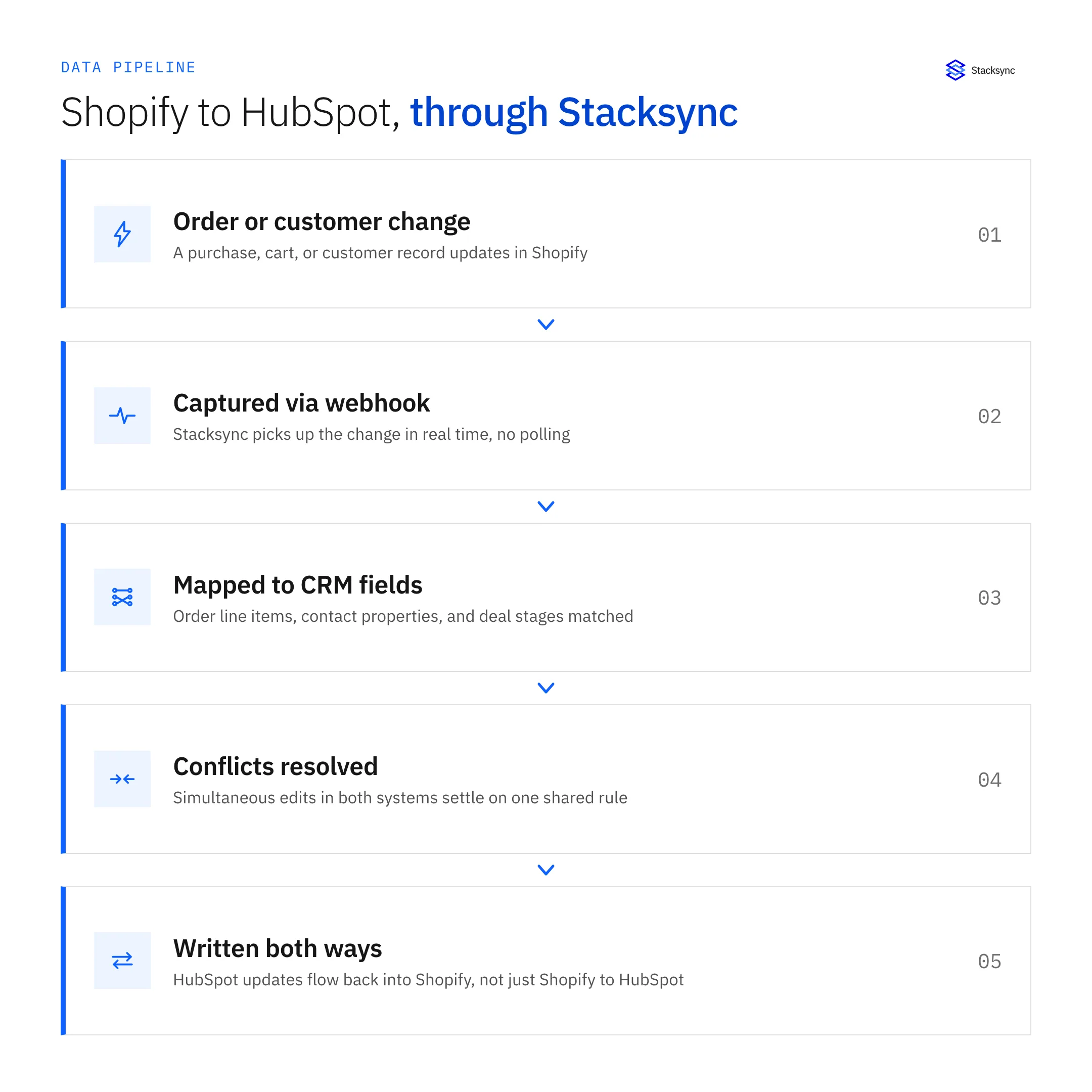
When planning your integration, consider these technical factors:
API Limitations and Rate Constraints
Both Shopify and HubSpot impose API rate limits that can affect synchronization performance. Enterprise-grade integration platforms typically handle these constraints through smart queuing and batching strategies.
Data Volume Management
For stores with large catalogs or high transaction volumes, data synchronization can become resource-intensive. Plan for appropriate handling of bulk data, especially during the initial historical data sync.
Security and Compliance
Ensure your integration solution adheres to data protection regulations (GDPR, CCPA, etc.) and implements appropriate security measures like encryption and access controls.
Error Handling Protocol
Establish procedures for handling synchronization failures, including notification systems, automatic retry logic, and manual resolution workflows for critical issues.
The Future of Shopify-HubSpot Data Integration
As e-commerce and CRM technologies evolve, integration capabilities continue to advance:
AI-Enhanced Data Synchronization
Artificial intelligence is beginning to play a role in smart data synchronization, automatically identifying relationships between datasets, suggesting optimal field mappings, and flagging potential data quality issues before they cause problems.
Real-Time Analytics Capabilities
Next-generation integration platforms are moving beyond basic data synchronization to enable real-time analytics that combine e-commerce and CRM data for instantaneous insights.
Expanded Ecosystem Connectivity
The future of e-commerce data integration extends beyond just Shopify and HubSpot to create interconnected ecosystems including advertising platforms, fulfillment systems, customer service tools, and financial software, all sharing consistent, real-time data.
Building Your E-Commerce Data Foundation
Effective Shopify HubSpot integration represents more than just a technical implementation. It's a strategic business advantage. By eliminating manual processes, ensuring data consistency, and enabling real-time information flow between your e-commerce store and CRM, you create the foundation for superior customer experiences and data-driven decision making.
Whether you opt for native integrations, third-party platforms, or custom development, the key lies in thoughtful planning, clear data governance, and ongoing optimization. The investment in proper integration pays dividends through improved operational efficiency, enhanced marketing effectiveness, and ultimately, increased revenue and customer satisfaction.
Ready to eliminate integration complexity? Book a Stacksync demo to discuss how bidirectional, real-time sync can transform your Shopify-HubSpot data flow.

FAQ
Frequently asked questions




Explore these integrations and topics
- connectorHubSpot integrations
- connectorShopify integrations
- platformTwo-way sync
- platformCRM synchronization
- Two-way sync guidesUnderstand two-way sync, record matching, field ownership, and production readiness.
- CRM synchronization guidesConnect customer records across sales, marketing, and operational systems.
Related articles


