






NetSuite Two-Way Sync Solutions: Enterprise Integration Guide
A practical guide to NetSuite two-way sync: field mapping for custom objects, conflict resolution, API governance limits, and keeping data current both ways.
- Author
- Ruben Burdin · Founder & CEO
- Published
- Updated
- Read time
- 13 min read

Integrating business systems often means connecting NetSuite, a widely used ERP platform, with other software and databases. Many organizations want their data to stay accurate and up-to-date across all platforms. Two-way sync is a method that helps make this possible.
This article explains what NetSuite two-way sync is, how it works, and why it is different from other approaches. The following sections break down the technical details and practical considerations for enterprise teams evaluating or implementing this type of integration.
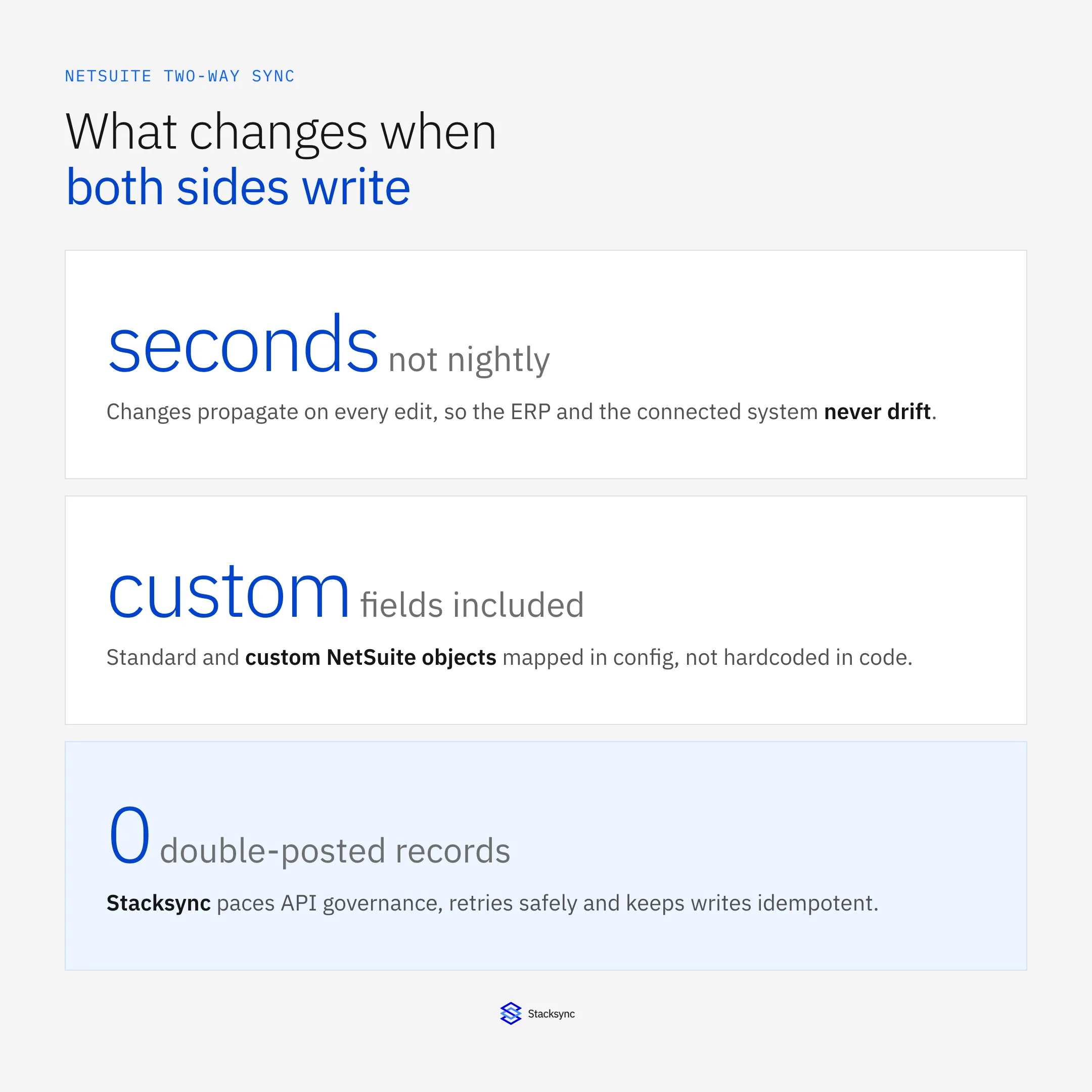
What Is NetSuite Two-Way Sync And Why It Matters
NetSuite two-way sync, also known as bi-directional synchronization, refers to the continuous exchange of data between NetSuite and an external system where updates flow in both directions. When a record is created, updated, or deleted in NetSuite, that change is reflected in the connected system. Likewise, changes made in the external system are automatically sent back to NetSuite.
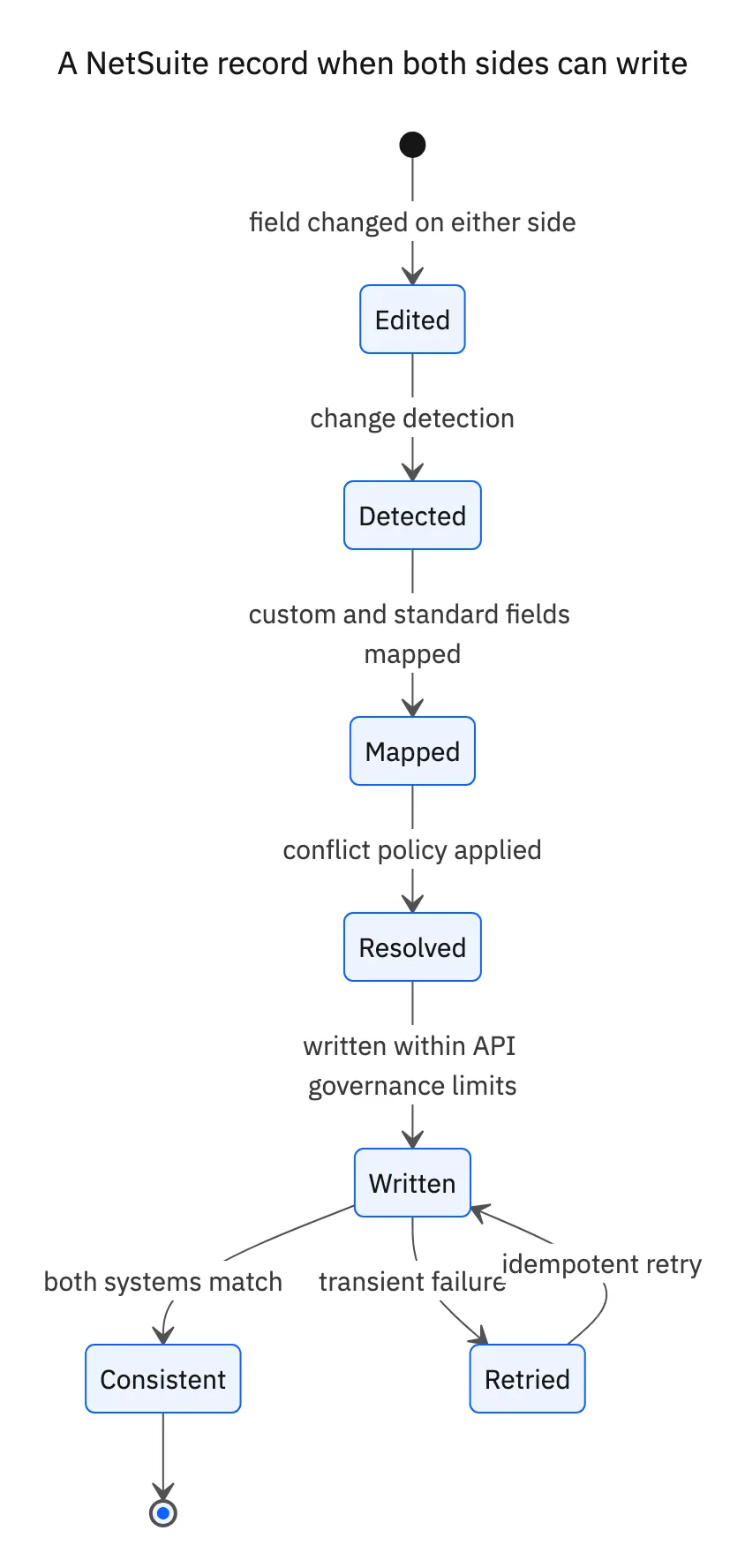
This approach goes beyond traditional one-way sync, which only moves data in a single direction. Two-way sync creates a unified view where both systems remain consistent and current, even as data is updated by different teams or processes. The core principle is that any change in one system is quickly and reliably mirrored in the other.
Core Benefits Of Bi-Directional NetSuite Integration
Bi-directional integration eliminates manual data entry across multiple systems. When information is automatically updated in both systems, mistakes from manual entry are reduced. Teams can trust that each department is working from the same data, which supports accurate planning and reporting.
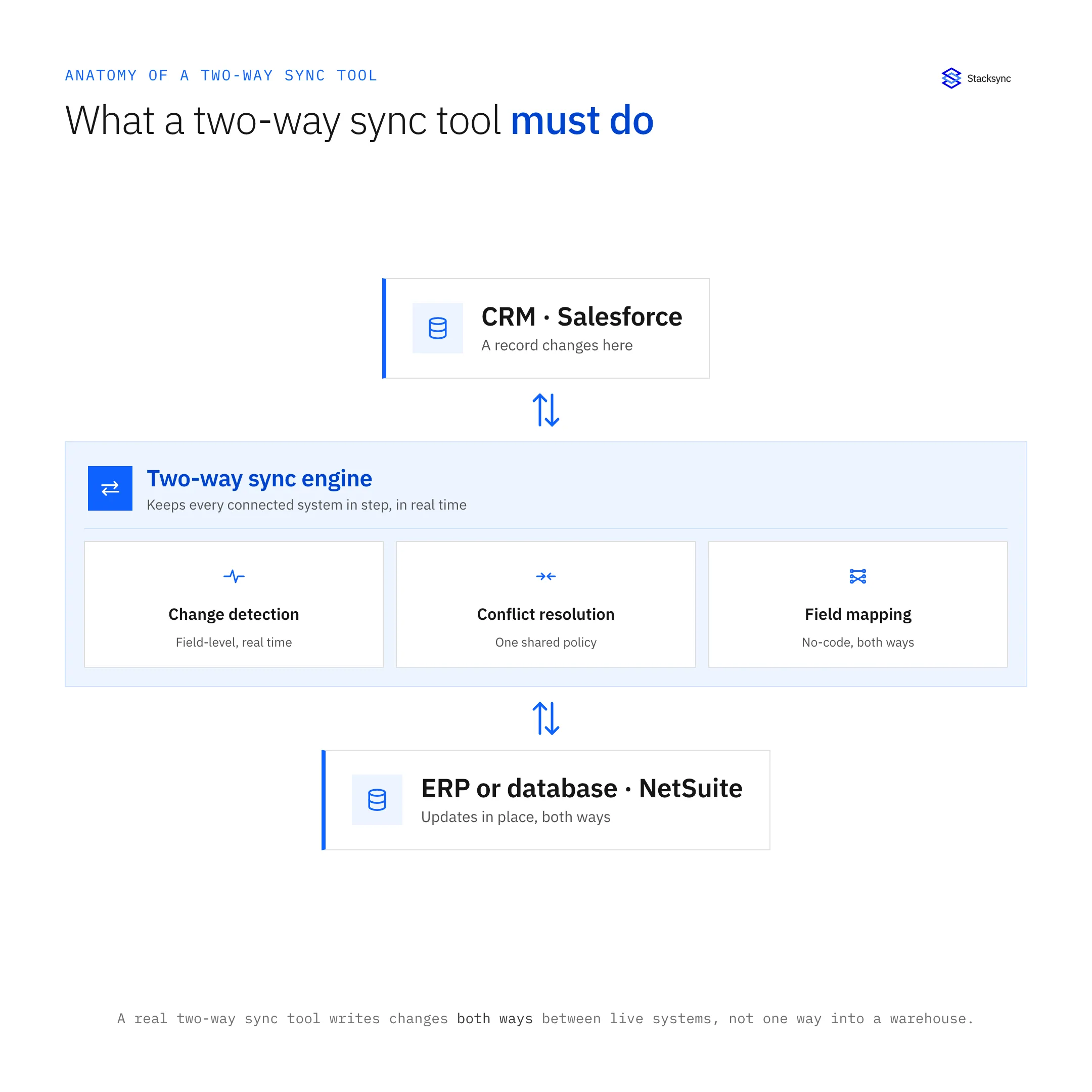
Real-time data exchange creates several operational advantages:
- Reduced errors: Automatic synchronization prevents the inconsistencies that occur when people manually enter data in multiple places
- Faster processes: Orders, inventory updates, and customer changes flow immediately between systems
- Better decision-making: Teams access current information without waiting for batch updates or manual transfers
- Improved customer service: Support and sales teams see the same customer data, creating consistent experiences
With processes aligned in real time, businesses can respond to changes without delay. Direct data exchange means that critical business information flows smoothly between departments and systems.
Real-Time Vs Scheduled Sync
Real-time sync updates records immediately after a change occurs, while scheduled sync processes updates in batches at set times. The selection between these methods depends on how urgent the data is, how much data there is, and system capacity.
Real-time sync works well for critical data like inventory levels or active sales orders. Scheduled sync handles high-volume data or less urgent updates during off-peak hours to reduce system load.
Real-Time Trigger Flow
Instant synchronization activates as soon as data changes in either NetSuite or the connected system. This process can use webhooks, which are automated messages sent from one system to another when an event happens. API polling is another option where one system regularly checks the other for updates.
Scheduled Batch Windows
Scheduled batch sync processes data at regular intervals, such as every hour or overnight. This method handles large amounts of data that do not require immediate updating. Batch syncing helps balance the load on both NetSuite and external systems by concentrating data transfer into limited windows.
Hybrid Strategies
Hybrid sync strategies combine real-time and scheduled sync for different types of data. Critical records like order statuses can be updated in real time. Less urgent or high-volume data like historical transactions can be processed in scheduled batches. This approach allows organizations to match the sync method to the importance and volume of each data type.
Records And Objects You Can Synchronize In Both Directions
Bi-directional synchronization between NetSuite and external systems supports a wide range of records and objects. The most commonly synchronized data includes customer and vendor information, transactional records, and inventory data.
Customer-related records include customers, contacts, and subsidiaries. Product information covers items, price books, and inventory balances. Financial transactions encompass sales orders, invoices, cash sales, and credit memos. Purchasing data includes vendor records, purchase orders, and bills.
Project management organizations often synchronize projects, tasks, and time entries. NetSuite also supports custom records and custom segments that organizations create for unique business processes. Files, attachments, fulfillment data, and shipping information can also be included in sync operations.
Field Mapping And Data Transformation Best Practices
Field mapping connects data fields from NetSuite to fields in external systems. Each system may store information differently, so mapping ensures the correct data points connect between them. Data transformation changes data formats, structures, or values so both systems interpret the information correctly.
Native And Custom Field Alignment
Standard NetSuite fields like "Customer Name" or "Invoice Number" often have direct equivalents in external systems. Custom fields, which organizations create for unique business needs, present more complexity. These fields may only exist in one system or have different data types. SuiteScript-backed fields, which are driven by scripts within NetSuite, may require additional logic to synchronize correctly.
Lookup Tables And Value Normalisation
Systems may represent the same information in different ways. A dropdown value in NetSuite might be "Active," while the external system uses "A" for the same status. Lookup tables translate these differences by listing equivalent values between systems. Value normalisation converts information into a consistent format, aligning picklist values and reference fields so data remains accurate after synchronization.
Conflict Resolution And Data Integrity Strategies
When two systems both allow updates to the same piece of data, simultaneous changes can create conflicts. Several resolution methods address these situations:
- Last-write-wins: Accepts the most recent update based on a timestamp, replacing earlier changes
- Manual review: Allows a person to decide which change to keep using a review queue for flagged records
- Field-level resolution: Compares individual fields within a record so only conflicting parts are examined independently
Data validation ensures information matches expected formats and rules before it is saved. Schema enforcement checks that each record follows the required structure. Referential integrity checks confirm that related records exist. Pre-commit validation tests data for accuracy and completeness before changes are finalized.
Scaling NetSuite Sync For Large Datasets And API Limits
Synchronizing large amounts of data with NetSuite requires careful management because NetSuite has specific limits on API requests within given periods. High-volume environments often process thousands or millions of records, creating challenges with throughput, latency, and back-pressure.
Smart Pagination And Incremental Loads
Large record sets are divided into smaller, manageable chunks using pagination. Incremental loads use timestamps, system notes, or change data capture to identify only records that have changed since the last sync. By focusing on new or modified data, incremental sync reduces the volume of information that moves between systems during each cycle.
API Quota Optimisation
NetSuite limits the number of API requests allowed within certain timeframes. Managing these limits involves batching multiple requests together to reduce total calls. When an API limit is reached, exponential backoff waits longer between retries rather than flooding NetSuite with repeated attempts. Intelligent retry mechanisms with idempotency provide reliable sync while respecting NetSuite's quotas.
Security, Compliance And Audit Requirements For ERP Integration
OAuth authentication controls how applications connect securely to systems like NetSuite without sharing passwords. Data encryption protects information while moving between systems (in transit) and while stored on servers (at rest). Key rotation changes encryption keys regularly to limit risk if a key is exposed.
Compliance standards set rules for data management and protection. SOC 2 evaluates how service providers handle customer information. ISO 27001 is a global standard for managing information security. GDPR governs data protection and privacy in Europe, including requirements for data processing agreements and geographic data storage options.
Audit trails trace the history of financial data as it moves between systems. Immutable logs record every action so changes can be traced back to their source. This supports accountability and helps organizations meet regulatory requirements.
Step-By-Step Implementation Guide For NetSuite Two-Way Sync
A structured approach maintains consistency and reduces errors when setting up two-way synchronization. The following steps outline the implementation process with focus on technical accuracy and operational control.
Connect NetSuite And Target System
Establish a secure connection between NetSuite and the external system. Authentication uses API credentials including username, password, application ID, and role assignment for NetSuite. OAuth 2.0 provides token-based authentication for security and flexibility. Configure permissions in NetSuite to allow the integration user access to only required data and operations.
Configure Authentication And Permissions
Apply role-based access control to limit what the integration user can access in NetSuite. Generate and store security tokens securely for authentication. Implement the principle of least privilege by granting only minimum permissions necessary for sync. Token governance includes periodic rotation and removal of unused tokens.
Map Records And Fields
Set up field mapping to link NetSuite fields with those in the target system. Specify data transformation rules where field types or formats differ. Test mappings with sample data to ensure correct alignment before full-scale operation. Document mapping decisions for future reference and audit purposes.
Define Sync Direction And Triggers
Specify sync direction for each record type, indicating whether data flows from NetSuite to the external system, from the external system to NetSuite, or both. Set event triggers to initiate syncs when records are created, updated, or deleted. Configure sync frequency according to requirements with options for real-time or scheduled synchronization.

Build Vs Buy Cost And Maintenance Comparison
Organizations can approach NetSuite two-way sync integration by building custom solutions internally or choosing third-party solutions. Each method involves different costs, risks, and timelines.
Internal Development Effort
Building custom integration requires software engineers with expertise in NetSuite APIs, external system APIs, and data synchronization logic. This includes time for requirement gathering, system design, coding, and testing. Ongoing maintenance involves fixing bugs, updating for API changes, and supporting system upgrades. Infrastructure costs include servers, monitoring, security, and backup systems.
Point Solution Licensing
Some providers offer dedicated NetSuite connector products with fixed pricing as annual or monthly subscriptions. These solutions may have limits on data volume, supported objects, or advanced features like custom field mapping. Vendor lock-in can occur if switching providers is complex or data mapping is not easily exportable.
iPaaS Total Cost Of Ownership
Integration Platform as a Service (iPaaS) products provide broader capabilities including multiple prebuilt connectors, governance tools, and security features. Costs include setup fees, license subscriptions, and support contracts. Many platforms charge based on data volume, number of integrations, or user seats.
Apply this in fencing fabrication and installation: proposed configuration and approved drawing revision
Fence fabricators connect commercial configurations to NetSuite sales orders under the same identity and ownership rules described in this enterprise guide. Preserve approved dimensions and materials so later fabrication work cannot be driven by an unreviewed change to the CRM proposal.
| Record to reconcile | Responsible owner | Rule to preserve |
|---|---|---|
| Proposed configuration | Sales or estimating | Capture dimensions and options without treating them as released fabrication instructions. |
| Approved drawing revision | Technical or fabrication owner | Identify the specification permitted for production. |
| Commercial order | Order administration | Own accepted quantities, price and customer authorization. |
An exception to plan for: Customer changes one gate width. Scope the revision to that gate and preserve unaffected fence sections. Acceptance check for the pilot: released configuration identifies its approved drawing version.
The fencing fabrication and installation hub connects the broader operating context. These guides develop the specific record mappings and decisions for this application:
How Stacksync Enables Enterprise-Grade NetSuite Two-Way Sync
Stacksync provides secure and scalable two-way synchronization between NetSuite and other business systems. The platform connects directly to NetSuite and external databases or SaaS applications, supporting real-time and batch syncing based on operational requirements.
Stacksync uses a no-code configuration interface, allowing teams to set up integrations without writing custom code. Enterprise features include versioning to track changes to sync configurations over time and role-based access control to manage permissions for different users. Audit logs maintain records of all integration events for traceability, while error queues capture and organize sync issues for review and resolution.
Initial integrations and sync flows can be deployed in days rather than months. This approach supports organizations with complex data environments and lean technical teams by reducing manual effort in deployment and ongoing management. To learn more or see a demonstration, schedule a session at https://www.stacksync.com/book-a-demo.
Frequently Asked Questions About NetSuite Two-Way Sync
How do NetSuite sandbox refreshes affect existing sync connections?
Sync connectors can be configured to reconnect automatically after a NetSuite sandbox is refreshed. Environment variables and connection aliasing help point integrations to the correct sandbox or production environment.
Can custom SuiteScript logic be integrated with no-code connectors?
Most modern integration platforms allow custom field mapping and basic data transformations. More complex SuiteScript logic usually requires creating custom scripts or combining no-code tools with additional development.
What happens when NetSuite and an external system update the same record simultaneously?
Timestamp-based conflict resolution or rules like "last-write-wins" are commonly used. For critical records, some solutions provide manual review queues to let someone choose which data to keep.
How are deleted NetSuite records handled in two-way sync?
Deleted records may be removed from both systems (hard delete) or marked as deleted with a status flag (soft delete). The approach depends on specific data retention and auditing requirements.
Does two-way sync impact NetSuite performance during business hours?
Well-designed sync processes use API rate limiting and can schedule updates for off-peak hours. Real-time sync typically has minimal impact on user experience during busy periods.

FAQ
Frequently asked questions




Related articles


