






Power BI with Dynamics 365: Real-Time CRM & ERP Sync
Power BI is only as current as its data. Learn why Dynamics 365 reports lag and how two-way sync keeps Power BI on live CRM and ERP data.
- Author
- Ruben Burdin · Founder & CEO
- Published
- Updated
- Read time
- 14 min read

A Power BI dashboard on top of Dynamics 365 is only as current as the last refresh. If sales closed an order an hour ago and the report still shows yesterday's pipeline, the problem is rarely Power BI. It is how the data gets there.
Most teams find out the hard way. Finance pulls one number from Dynamics 365 Business Central, sales quotes a different one from the CRM, and the dashboard matches neither. More data across ERP and CRM makes it worse, because every extra system is another copy that can drift.
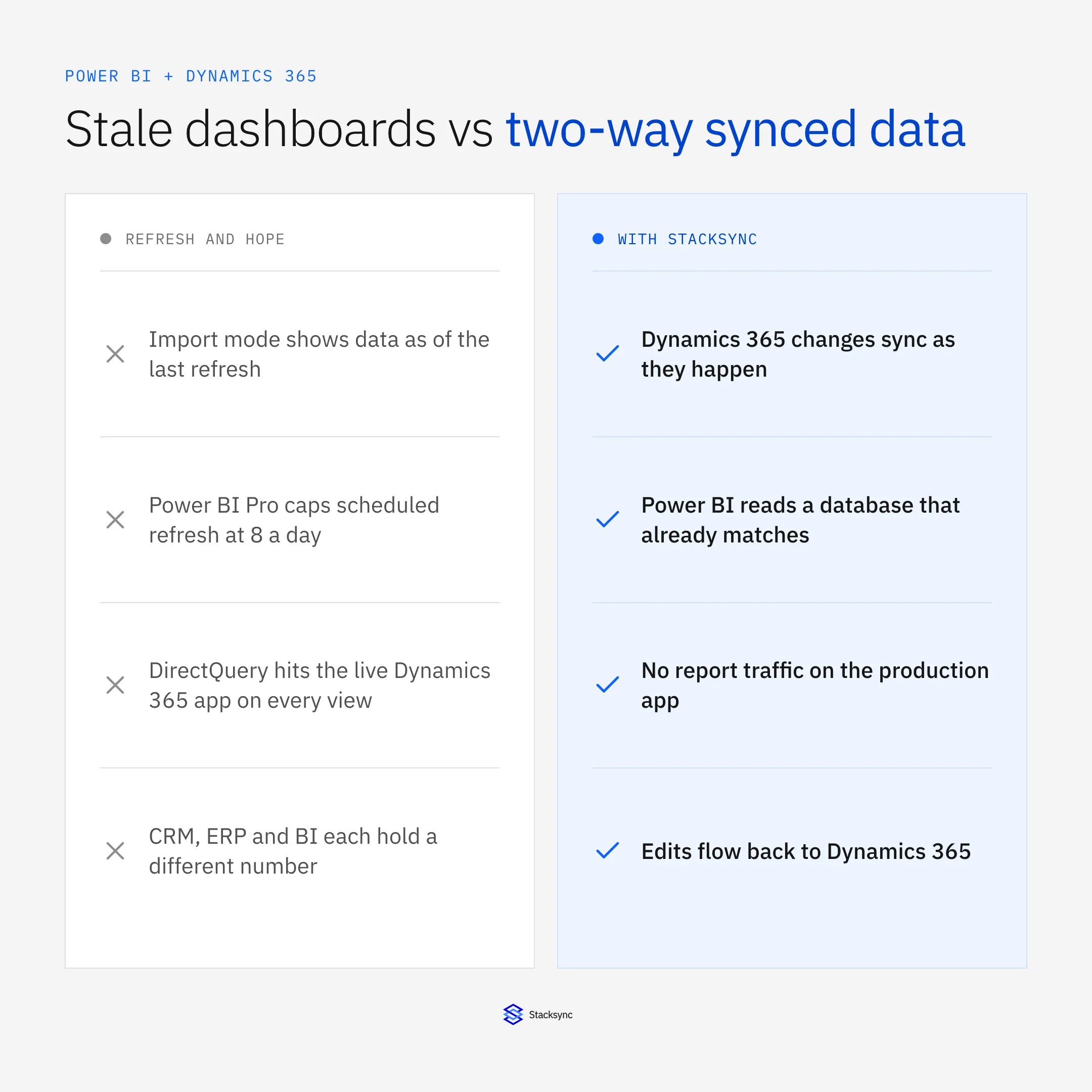
Your data is one of your most valuable assets, but only if the people reading it can trust it. Stale or conflicting numbers cost you ground against competitors and lead to slower, weaker decisions.
Power BI is the go-to reporting tool for Dynamics 365 Business Central and Dynamics 365 CRM users. Real-time data can power next-level analytics, but only if that data is clean and accurate, so organizations need data that is plentiful, reliable and well integrated across systems. [1] This is where Stacksync fits: it keeps Dynamics 365 and your other systems in two-way sync, so Power BI reads data that is already consistent. Power BI then presents it as reports and interactive tables that are easy to use, analyze and share across the business.
Data visualization
Power BI offers many visualization options, from tables and diagrams to maps and charts. High-quality data is accurate, complete, consistent, timely and accessible, and poor data quality directly hurts the reliability of BI insights. [2] Syncing the source systems first means every visual is built on the same records.
Data processing
Power BI digs into your ERP and CRM data and surfaces the numbers that matter. As more decisions rest on BI, data quality matters more. Businesses need data that is: Clean: free from errors, duplicates and inaccuracies. Integrated: unified across systems as a single source of truth. Timely: updated in real time to reflect the latest information. [1] Keeping the source systems synchronized is what makes those three properties hold before the data reaches a report.
Data sharing and distribution
You can schedule data updates in Power BI and share reports, dashboards and visualizations with stakeholders inside or outside the company. It also sends instant alerts about data anomalies and customer issues, and analyses can be shared across departments in real time. [3] The shared view is only as current as the data underneath it, which is why the freshness of the source systems matters.
ETL and data storage
Power BI for ERP uses ETL: extract data from its source, transform and standardize it, then load it into a new location such as a data warehouse. Power BI was not designed for real-time data, like most traditional BI tools. Teams rely on frequent refreshes through a data gateway, which is fine for daily reports. As streaming data grows and 24x7 customer expectations rise, scheduled refresh is not enough. [4] Stacksync removes the delay at the source: changes in Dynamics 365 are synced to the database or system Power BI reads from, instead of waiting for the next batch.
Multi-source data
Power BI can connect to many internal and external sources, such as online services, text files and other ERP and CRM databases. Integrating sources like CRM systems, legacy ERP software and scattered customer feedback is still complex and time-consuming, especially for businesses with limited IT resources. [5] Syncing those systems to each other beforehand means Power BI does not have to reconcile conflicting copies.
Full integration with other Microsoft products
Power BI links easily to products in the Dynamics 365 family, for example the Business Central ERP, and to Microsoft Teams. Connectors also reach Office 365, SharePoint, Salesforce and more than 100 other applications. [6] Stacksync covers the operational side of that picture, keeping data consistent between Dynamics 365 and the third-party apps around it.
With this many BI features, Power BI for ERP and CRM serves everyone from end users and managers to business analysts and IT. When the underlying systems are in sync, all of them read the same numbers.
What Power BI shows across your ERP and CRM
Power BI lets you quickly access and visualize data from across the business, including:
- Sales and Marketing
- Transactions
- Finance
- Customer Interactions
- Customer Service
- Products
- HR / Employees
- Supply chain and more…
Real-time data is only as useful as its quality. Make sure the data streaming into Power BI is accurate and up to date, which can mean regular audits of your data sources and protocols for data entry. High-quality data leads to more reliable insights and better decisions. [7]
Power BI supports flexibility, security, efficiency and collaboration across teams. Those benefits grow when everyone works from the same synchronized records in every business system.
Senior Management & Decision-Makers
Decision-makers are busy and time is short. Management needs to see and respond to daily issues. Increased agility: Power BI's real-time monitoring lets businesses adapt quickly, whether that means adjusting operations, changing strategy or seizing a new opportunity. [8] Reports and dashboards give management fast access to what they need, and they are only worth acting on when they reflect current, consistent data across operational systems.
Business & Data Analysts
Analysts are often overwhelmed by data volume, and their job is to get the right analysis to the right people at the right time. Efficiency: clean, consistent data cuts the time spent preparing data for analysis, so analysts can focus on insights. Trust: reliable data keeps the business and its customers confident that records are accurate. [2] Analysts use Power BI to turn raw data into the insights that matter and make it available to all end users. Synchronized source systems mean less time cleaning and reconciling before that work starts.
IT Team
IT teams use Power BI to secure business data, manage access, monitor user activity and support compliance, whether the data comes from inside or outside the company. That means a secure, governed environment, management tools for data quality and consistency, and data cleansing before information reaches BI tools. Stacksync complements this by automating synchronization between systems, which reduces manual upkeep for IT.
Qlik has been recognized as a Leader for 15 consecutive years in the Gartner Magic Quadrant for Analytics & Business Intelligence (BI). [9] Microsoft is also recognized as a leader in business intelligence and analytics; see why Gartner named Microsoft a Leader in the 2022 Gartner Magic Quadrant for Analytics and Business Intelligence Platforms. [10] Power BI is an easy-to-use BI tool for exploring the business data that matters and making data-driven decisions.
Power BI is a collection of software services, apps and connectors that work together to create, share and consume business insights.
Power BI
Power BI is a cloud-based business intelligence tool that consolidates data from multiple sources into one platform. BI tools typically use extract, transform and load (ETL) to aggregate structured and unstructured data, then remodel it and store it centrally so applications can query it as one data set. [3] That lets you build accurate reports and dashboards that tell the story of how the business is performing. Power BI can consolidate data across sources and programs even when they are not integrated with each other, but the result is much better when the underlying systems are synchronized first.
Why Dynamics 365 ERP & CRM and Power BI?
Microsoft Dynamics 365 is one of the leading ERP and CRM solutions on the market, providing an end-to-end suite that covers all business operations, from Finance and HR to Sales, Marketing, Manufacturing, Distribution, and beyond. Through our expert Microsoft Dynamics 365 development services, we help you fully unlock its capabilities and tailor it to your needs. Beyond core modules, we offer a range of value-add enhancements, including Dynamics 365 Add-ons and DynamicsShop apps, designed to meet your specific business requirements and maximize your technology ROI.
Power BI is an industry-leading BI and analytics tool. It lets you pull data from multiple sources and systems and present it in formats people understand, and it can quickly generate reports, dashboards and visualizations that give a 360 view across the business. It turns raw data into meaningful insights, and its value for visualization and business intelligence is well documented. [11] When the underlying systems are synchronized, those reports also stay consistent and current.
Power BI easily integrates with Dynamics 365 ERP and CRM
There are two main routes: Power BI Desktop and the Power BI Service. Desktop suits technical users, while broader business users usually prefer the Service, an online option that is easy to navigate and gets reporting running quickly. At the heart of the Dynamics integration is Dynamics 365 Business Central, a leading ERP system that streamlines operations, and combining it with Power BI gives you much better visibility into your data. [12]
With the right BI setup for ERP or CRM, key data is extracted, processed and connected regardless of the source, including PDFs, audio and image files or other data systems. Once converted, it is accessible on desktop, tablet and mobile. A common challenge is reporting financials from lagging data: by the time data is gathered it can be days or weeks old, which disconnects decisions from the financial reality of the business. [13] Keeping Dynamics 365 in real-time sync with the systems around it closes that gap, because Power BI reads current records.
Power BI Desktop
Once installed, Power BI Desktop lets you create advanced analytics and personalized, dynamic reports, and it adds AI features. It connects to many data sources and gives you a platform for managing real-time data, with interactive dashboards that make the information easier to understand. [7]
Power BI Service
The Power BI Service is cloud-based SaaS used to publish and share finished reports with other teams and users. Its standout feature is the ability to connect to live data sources, so decision-makers interact with the data and spot trends, outliers and opportunities as they happen instead of reading static reports. [8]
Power BI Mobile
Power BI works on all devices, so mobile users get secure access to their data with real-time updates. It can also stream live data: you can connect dashboards to real-time sources through REST APIs or Azure services and monitor sales performance, customer interactions or system health without delay. [7]
One set of reports across Dynamics 365 ERP and CRM
Power BI helps businesses answer questions about performance, which gives them an edge in the market. Integrating an ERP with Power BI turns raw data into actionable insights and faster decisions, and making informed decisions quickly is key to staying competitive. [12] Common reasons organizations invest in a BI tool for ERP and CRM include:
- Rapid access to real-time reporting, analysis, dashboards and visualizations
- Improve operational efficiency
- Know and monitor market trends and patterns
- Improve competitiveness and competitor analysis
- One version of the truth for everyone
- KPIs and metrics
- Business intelligence for all ERP and CRM users
Organizations that meet these criteria extract actionable insights and also respond faster to market changes, spot emerging opportunities and reduce risk. [1] Stacksync supports the first criterion, a synchronized, high-quality data foundation, which is what makes the rest of the Power BI analytics reliable.
Power BI Reports
Reports present multiple dashboards and visualizations from a dataset, and custom reports can be built on demand. For example, to see Product Sales Pipeline performance you can build dashboards for specific pipeline datasets. Seeing current and historical data in context lets companies move quickly from insight to action, and business intelligence supports both real-time adjustments and long-term strategy: fixing inefficiencies, adapting to market shifts, correcting supply problems and solving customer issues. [3]
Power BI Dashboards
Dashboards highlight specific trends, patterns and insights for informed decisions. A dashboard can combine visuals from multiple data sources to give a 360 view of overall performance, not just a snapshot of a single source. You choose which visual elements to include and how to arrange them, so the format fits your business, and you can share the same reports across teams so everyone has access to vital data. [7]
For example, you can build a dashboard of the full sales pipeline across your product range for a complete picture of pipeline performance. Improved accuracy: outdated data leads to wrong decisions, and real-time data keeps you working with the latest information and reduces the risk of errors. [8] Stacksync keeps the records behind those dashboards aligned across systems.
Power BI Visualisations
Visualizations help you interpret the insights Power BI finds and present them as a visual story. As businesses adopt digital transformation strategies, Power BI helps improve operational efficiency, understand market trends and support growth, and its visualization and business intelligence capabilities give organizations a competitive edge. [11]
Power BI Apps
Power BI Apps bring related dashboards and reports together in one central, easy-to-reach place and make sharing with stakeholders simple, so everyone has the same 360 view of the data that matters. Collaboration and transparency: dashboards shared with your team mean everyone works from the same data, which makes it easier to stay aligned and decide together. [8]
Microsoft Dynamics 365 ERP & CRM Data Sources
Power BI streamlines reporting in one unified experience across your ERP and CRM environment and increases the return on your Dynamics 365 investment. Integrating Dynamics 365 Customer Engagement (CE) with your Dynamics 365 ERP and reporting on that data with Power BI changes how your organization accesses and uses data. Unified data access: data from disparate sources is available in one format, giving a comprehensive view of operations. Operational agility: when ERP data such as production schedules and inventory levels is combined with customer-facing data from Dynamics 365 CE, organizations can respond quickly to market changes, customer needs and operational challenges. Informed decision making: the combined data gives leaders more nuanced insight. [14]
Why Power BI reports lag behind Dynamics 365, and how to fix it
A report goes stale for one of three reasons: the dataset only refreshes on a schedule, the report queries Dynamics 365 live and slows the production app, or the data lives in two systems that no longer agree. Which one you hit depends on how Power BI gets the data.
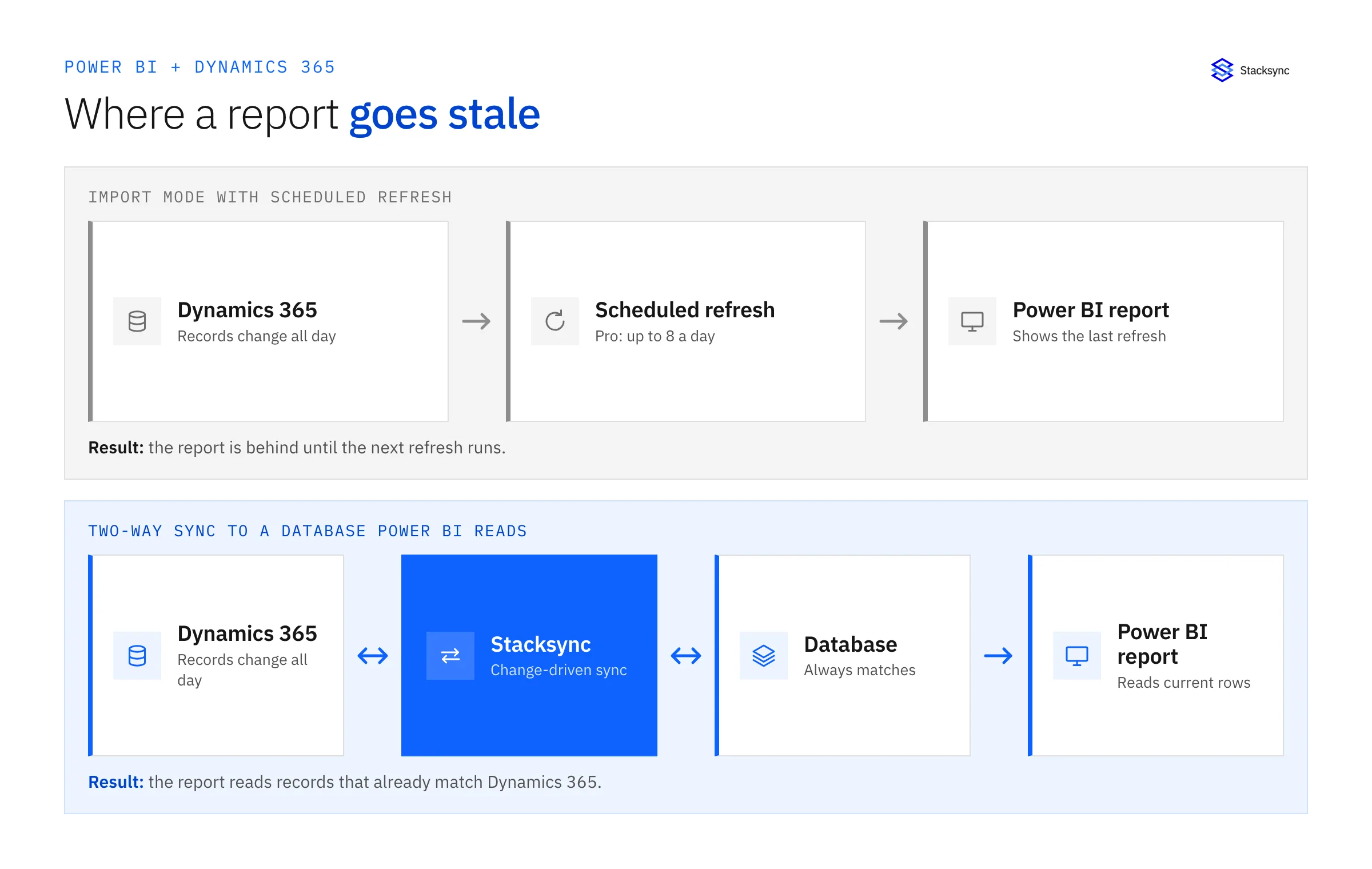
Four ways to feed Power BI from Dynamics 365
| Approach | How fresh the data is | Load on Dynamics 365 | Changes flow back to Dynamics 365 |
|---|---|---|---|
| Import mode with scheduled refresh | As fresh as the last refresh. Up to 8 scheduled refreshes a day on shared capacity, up to 48 on Premium, PPU or Fabric capacity | Spikes during each refresh | No, reports only read data |
| DirectQuery against Dynamics 365 or Dataverse | Live at query time | Every report view queries the production app | No, reports only read data |
| Batch ETL or ELT into a warehouse | As fresh as the batch schedule | Spikes during each extract | No, the pipeline is one-way |
| Stacksync two-way sync to a database Power BI reads | Near real time, driven by changes in Dynamics 365 | Low, only changed records are synced | Yes, edits in the database or other connected systems are written back |
How common Power BI data paths compare for Dynamics 365 reporting
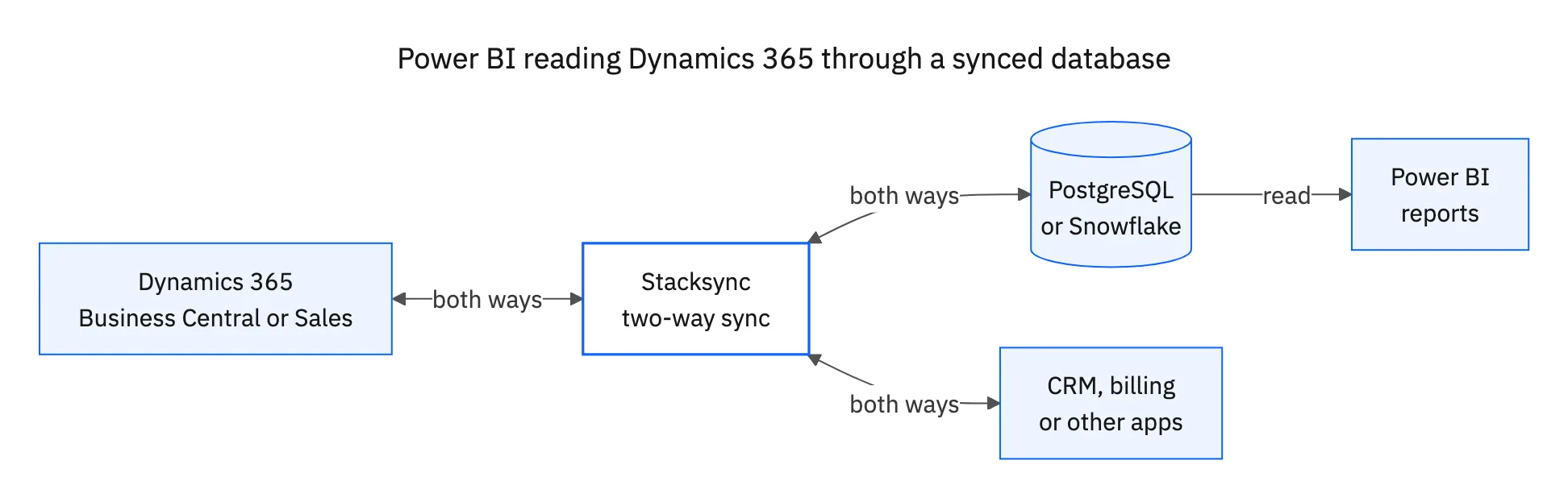
Microsoft documents the refresh limits in its Power BI data refresh guide. The first three options leave Power BI reading from a copy that is either delayed or hitting production. The fourth moves the work upstream. Stacksync keeps Dynamics 365 Business Central or Dynamics 365 Sales in two-way sync with a database such as PostgreSQL or Snowflake, and Power BI reads that database. See the Microsoft Power BI connector for what is supported on the Power BI side.
What to check before you pick one
- How many report refreshes per day do stakeholders actually need, and is incremental refresh enough for large Dynamics tables?
- Can your Dynamics 365 environment absorb live DirectQuery traffic during month-end close?
- Do other systems, such as a CRM, billing or a data warehouse, need the same Dynamics records?
- Does anything need to write back to Dynamics 365?

What teams gain from Power BI on Dynamics 365
Power BI as the reporting layer over Dynamics 365 ERP and CRM changes how teams work with their data, and the benefits are largest when the underlying data is synchronized and kept at high quality.
- Connect to almost any data source and consolidate data in one central location.
- Present your data in easy-to-understand visualization formats such as graphs and charts.
- Give users pre-built dashboards, reports and data models, with the flexibility to build their own using custom features.
- Show data trends and patterns over time to improve performance and adjust strategy and goals.
- Share dashboards and other business insights across the organization, including key stakeholders, budget holders and decision makers.
- Access reports, dashboards and charts on the go from mobile.
- Filter key business and customer data easily.
With Power BI's features, SMBs can streamline data integration, enforce data governance and get actionable insights from consolidated data. [5] A successful implementation still depends on synchronized, high-quality data, and Stacksync provides that by keeping your Dynamics 365 systems in two-way sync with the applications connected to them.
Spend less time preparing data and more time visualizing it. Using Power BI over Dynamics 365 Business Central and Dynamics 365 CRM gives you deeper insight into end-to-end operations, for better decisions, performance and profitability. Ensure real-time accuracy: keep datasets up to date so BI systems produce timely insights. As real-time insights grow in importance, businesses should prioritize real-time data matching and cleansing tools that keep up with fast-moving data. That proactive approach keeps the data powering BI accurate and current. [1]
Keeping Dynamics 365 data current for Power BI with Stacksync
Stacksync gives your ERP and BI investments a data synchronization foundation: Dynamics 365 stays in two-way sync with the CRMs, databases and apps around it, so Power BI reports on records that already agree.
The demand for reliable, clean data will keep growing as digital transformation reshapes industries, so businesses that build a strong data foundation now are better placed for future BI success. [1] Stacksync's real-time synchronization platform gives your Power BI implementation consistent data across all connected systems.
To see how your organization can get better business intelligence from synchronized, high-quality ERP and CRM data, contact Stacksync or request a free 30-minute consultation with our Dynamics 365 ERP and CRM data synchronization specialists. We help make sure your Power BI investment delivers value through reliable, real-time data synchronization.

FAQ
Frequently asked questions




Explore these integrations and topics
- platformTwo-way sync
- platformCRM synchronization
- platformCRM and ERP integration
- platformDatabase synchronization
- Two-way sync guidesUnderstand two-way sync, record matching, field ownership, and production readiness.
- CRM synchronization guidesConnect customer records across sales, marketing, and operational systems.
- CRM and ERP integration guidesPlan account, order, invoice, and payment flows between commercial and finance teams.
- Database synchronization guidesWork through database change capture, application writes, and reliable record reconciliation.
Related articles


