






Best Data Integration Tools for Small Business and Mid-Market
Data integration platforms priced for small and mid-market teams: what you get at each tier, no-code setup, and real-time two-way sync versus batch ETL.
- Author
- Ruben Burdin · Founder & CEO
- Published
- Updated
- Read time
- 9 min read

Today competitive landscape, small and mid-market businesses (SMBs) rely on a specialized stack of SaaS applications to run their operations. Your CRM, ERP, marketing automation platform, and financial software are essential, but they often operate in isolation. This creates disconnected data, fragmented, inconsistent, and outdated information spread across the organization. The result is operational inefficiency, unreliable reporting, and a disjointed customer experience.
The technical challenge is clear: how to unify these disparate systems to create a single source of truth without dedicating a large engineering team or budget to building and maintaining brittle custom integrations. The solution lies in data integration platforms, which are dedicated to connect applications, synchronize data, and automate workflows.
This article provides a technical overview of the best data integration tools for small and mid-market businesses. For the full enterprise field, see the wider platform comparison, comparing their capabilities and identifying the optimal use case for each. We will cover everything from simple automation tools to enterprise-grade platforms designed for complex, real-time data synchronization.
Understanding Data Integration: ETL, iPaaS, and Operational Sync
Not all data integration challenges are the same. The right tool depends entirely on the technical objective. Data integration solutions generally fall into three categories:
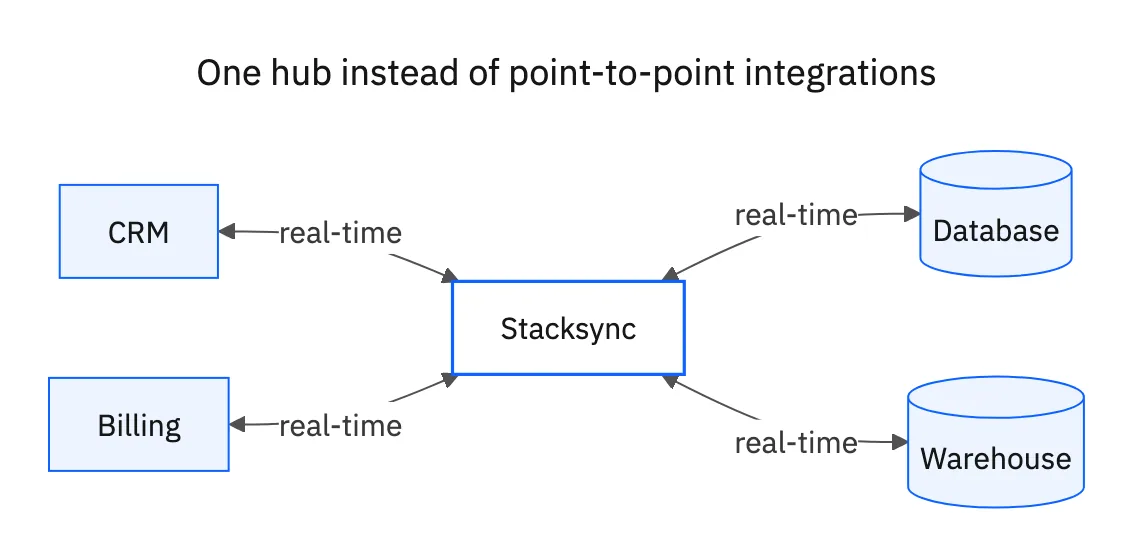
- ETL/ELT (Extract, Transform, Load / Extract, Load, Transform): These tools are designed for analytics. They extract data from various source systems (like your CRM or transactional database), load it into a central data warehouse (like Snowflake or BigQuery), and transform it for analysis and business intelligence. This process typically runs on a schedule (e.g., every 24 hours) and is fundamentally one-way.
- iPaaS (Integration Platform as a Service): iPaaS platforms are general-purpose tools for connecting applications and automating workflows. They offer a wide range of pre-built connectors and visual builders to create "recipes" or "flows" that trigger actions between systems (e.g., when a new lead is added in HubSpot, create a contact in Zoho CRM). While versatile, they may lack the robustness required for complex, high-volume, bi-directional data synchronization.
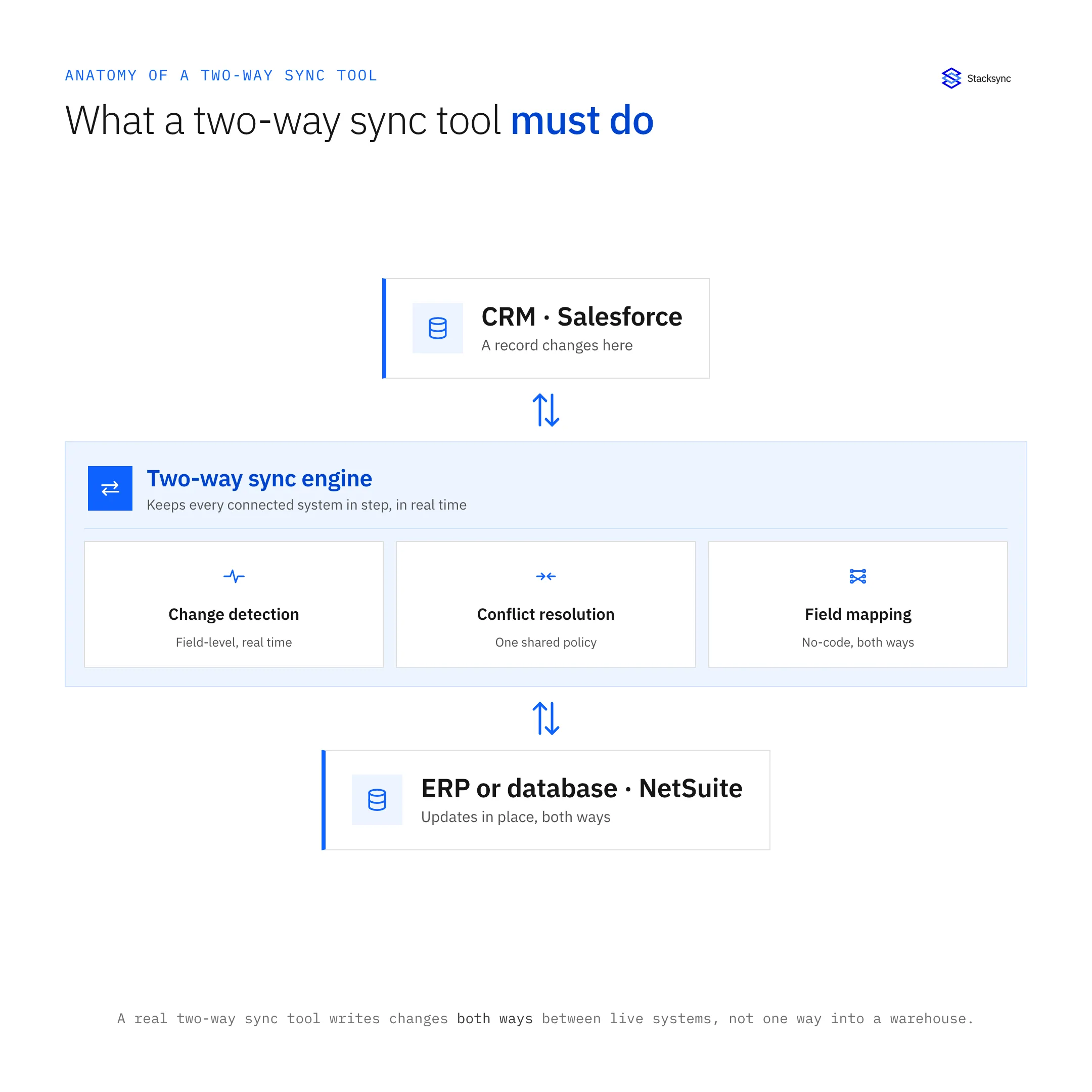
- Operational Data Synchronization: This is a more specialized category focused on maintaining real-time, bi-directional data consistency between core operational systems. The goal is not just analytics or simple task automation, but ensuring that business-critical systems like your CRM, ERP, and production databases are always in perfect sync. This requires sophisticated capabilities like low-latency data propagation, advanced conflict resolution, and guaranteed data integrity.
Key Features of a Modern Data Integration Platform
When evaluating solutions, focus on these critical technical capabilities:
- Connector Ecosystem: The platform must have high-quality, pre-built connectors for the specific applications, databases, and ERPs in your stack.
- Synchronization Models: Look for flexibility, including support for one-way and true bi-directional sync, real-time change data capture (CDC), and scheduled batch processing.
- Data Transformation: The tool must be able to handle schema differences between systems, allowing you to map fields and transform data formats on the fly.
- Reliability and Error Handling: critical integrations demand automated retries, comprehensive logging for diagnostics, and proactive alerting to prevent silent failures.
- Scalability and Performance: The platform must scale to handle your data volume as it grows, without introducing latency or performance slowdowns.
- Security and Compliance: Enterprise-ready security is essential. Look for certifications like SOC 2 Type II, GDPR, and HIPAA compliance to ensure data is protected in transit and at rest.
Data Integration Platform Comparison
html
Integration Tools Comparison
| Tool | Primary Use Case | Sync Model | Key Strength | Target User |
|---|---|---|---|---|
| Fivetran | ETL/ELT for Analytics | One-way, Batch | Automated data replication to warehouses | Data Analysts, Engineers |
| Coupler.io | ELT/ETL | One-way, Batch | Simplicity, connecting apps to spreadsheets | Business Users, Marketers |
| Celigo | iPaaS / Workflow Automation | One-way & Bi-directional | Pre-built integration templates (e.g., NetSuite) | IT Teams, Business Analysts |
| Zapier | Task Automation | One-way, Trigger-based | Ease of use for simple, linear workflows | Non-technical Users |
| Stacksync | Operational Data Sync | Real-time, Bi-directional | Guaranteed data consistency for CRM, ERP, DBs | Engineering, Revenue Operations |
Top Data Integration Tools for SMBs and Mid-Market
Here is a breakdown of leading platforms, categorized by their primary function, to help you select the right tool for your specific technical requirements.
For Analytics: ETL/ELT Platforms
These tools excel at moving data from your operational systems into a data warehouse for analysis.
- Fivetran: A market leader in automated data movement, Fivetran specializes in reliable, maintenance-free ETL pipelines. With over 500 pre-built connectors, it automates the process of extracting data from sources like Salesforce, NetSuite, and databases and loading it into a central data warehouse. It is an excellent choice for teams that need to centralize data for business intelligence but do not require real-time or bi-directional capabilities.
- Matillion: Matillion is a cloud-native data integration platform optimized for cloud data warehouses like Snowflake, Amazon Redshift, and Google BigQuery. Its low-code/no-code interface makes it accessible to a broad range of users, while its pushdown optimization feature leverages the power of the target warehouse to perform transformations efficiently.
- Coupler.io: Designed for simplicity, Coupler.io is a no-code platform that helps businesses automate data flows into destinations like Google Sheets, Microsoft Excel, and BigQuery. It supports a wide range of business apps and is ideal for small to mid-sized businesses that need to create automated reports and dashboards without technical overhead.
- Estuary Flow: For businesses that need both real-time and batch processing, Estuary Flow is a powerful option. It supports ETL, ELT, and Change Data Capture (CDC) to stream data changes as they happen. With over 150 native connectors and compatibility with the Airbyte open-source connector library, it offers significant flexibility.
For General Workflows: iPaaS Platforms
iPaaS solutions are the swiss army knives of integration, designed to connect a wide array of applications and automate business processes.
- Celigo: Celigo is a cloud-based iPaaS highly regarded for its pre-built integration templates that accelerate deployment. It is particularly strong for connecting common business applications and offers a dedicated solution for syncing contacts and leads between HubSpot and Zoho CRM. Its user-friendly UI makes it accessible for both business and technical users. See our full Celigo comparison for how it stacks up on real-time sync.
- Zapier: Zapier is the go-to tool for simple, no-code task automation. It allows users to create "Zaps" that connect two or more apps to automate repetitive tasks. While it's incredibly easy to use for linear workflows (e.g., "when this happens, do that"), it lacks the depth for true data synchronization, such as handling updates, deletions, or conflict resolution.
For Operational Integrity: Real-Time, Bi-Directional Sync
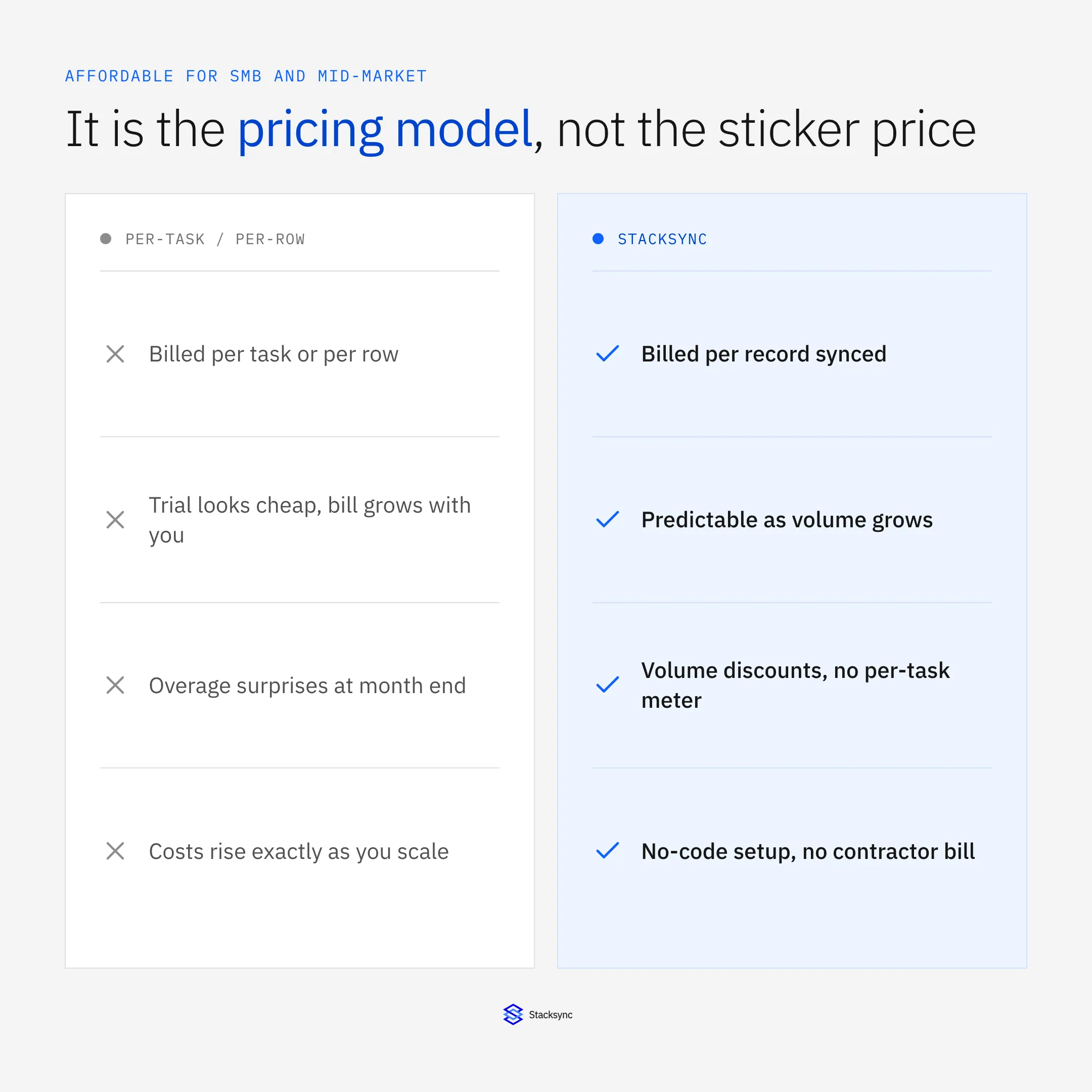
When data consistency across operational systems is critical, generic iPaaS and ETL tools fall short. They are not built to handle the complexities of real-time, bi-directional data flows. Attempting to build a two-way sync with an iPaaS often involves creating two separate one-way flows, which introduces latency, creates race conditions, and lacks a central mechanism for conflict resolution. This can lead to data corruption and silent failures that erode trust in your data.
This is where a dedicated operational data synchronization platform becomes essential.
- Stacksync: Stacksync is engineered specifically to solve the challenge of real-time, bi-directional synchronization for enterprise data. It provides a reliable, reliable, and scalable platform to ensure systems like your CRM (Salesforce, HubSpot), ERP (NetSuite), and databases (PostgreSQL, MySQL) remain consistent.
Unlike generic iPaaS tools, Stacksync offers a true bi-directional sync engine that propagates changes at the field level with low latency. It includes automated conflict resolution and sophisticated error handling to help maintain data integrity. For businesses needing to connect a CRM with a database or execute a complex Salesforce-NetSuite sync, Stacksync provides the power of a custom-coded solution with the simplicity of a no-code setup.

Deep Dive: Common Integration Scenarios
Let's examine how these tools apply to common integration challenges faced by SMBs and mid-market companies.
Scenario 1: Salesforce and NetSuite Integration
Connecting Salesforce (sales) with NetSuite (finance and operations) is a critical but notoriously difficult integration. Data must flow smoothly in both directions to provide a unified view of the customer lifecycle.
- The Challenge: A new "Closed Won" opportunity in Salesforce must create a Sales Order in NetSuite. Subsequently, the order status and fulfillment details from NetSuite must update the record in Salesforce. This requires handling complex object relationships and maintaining data integrity across both systems.
The Options:
- Native Connectors: NetSuite offers tools like SuiteTalk APIs for integration. While supported by NetSuite, they often lack the flexibility to handle complex custom fields or business logic without significant development effort.
- Enterprise iPaaS: Platforms like MuleSoft can manage this integration but are often prohibitively expensive and complex for mid-market businesses, requiring specialized developers.
- dedicated Sync: A platform like Stacksync is designed for this exact use case. It handles the bi-directional flow, manages the complex record associations between Salesforce and NetSuite objects, and helps ensure data consistency in real-time.
Scenario 2: Syncing HubSpot and Zoho CRM
A common scenario involves using HubSpot for marketing automation and Zoho CRM for sales execution. Keeping contacts, leads, and companies synchronized is essential for a smooth handoff from marketing to sales.
- The Challenge: A new lead from a HubSpot form needs to be created in Zoho CRM instantly. If a sales rep updates that contact's information in Zoho, the change must be reflected back in HubSpot to ensure marketing campaigns are targeting the right person with the right message.
The Options:
- Zapier: Excellent for the initial creation of a Zoho lead from a HubSpot form submission. However, it is not designed to handle ongoing, bi-directional updates or resolve conflicts if the same record is changed in both systems simultaneously.
- Celigo: Offers a pre-built integration template that provides a more reliable sync than Zapier, capable of handling more complex mappings and workflows between the two systems.
- Stacksync: For organizations where real-time accuracy is paramount, Stacksync helps ensure that any update on either platform is propagated quickly. Its conflict resolution and error handling provide a level of reliability that helps marketing and sales teams avoid working with conflicting data.
Making the Right Choice for Your Business
The best data integration tool is the one that directly solves your specific technical problem with the right level of power and simplicity.
- Choose ETL/ELT tools like Fivetran or Matillion when your primary goal is to centralize data from multiple sources into a data warehouse for analytics.
- Choose iPaaS platforms like Celigo or Zapier when you need to automate workflows and connect a wide range of applications for general business processes.
- Choose Stacksync when your primary goal is maintaining real-time, bi-directional data integrity between your most critical operational systems, your CRM, ERP, and databases.
By selecting the right platform, you help your teams with consistent, accurate data, simplify operations, and free up valuable technical resources to focus on innovation and growth.

FAQ
Frequently asked questions




Related articles


